

You spent hours sourcing the perfect product, but your listing still isn’t converting. Most of the time, the culprit is the very first thing a buyer sees: a bad product photo. On Amazon, Shopify, and eBay, buyers scroll fast. A dark or off-white background instantly signals “unprofessional,” and most shoppers move on without clicking.
White background photography for ecommerce fixes that. A clean white backdrop removes distractions and makes product colors look accurate. It also builds instant buyer trust. Best of all, you do not need a professional studio to get it right; basic gear at home works just as well.
In this guide, you will learn exactly how to set up your shoot, choose the right lighting, and do a white background photo edit that meets marketplace standards.
Why White Background Matters for Ecommerce
A pure white backdrop puts all attention on the product itself. Colors appear more accurate, edges look sharper, and the overall image feels clean and professional.
Here is why it directly impacts your ecommerce performance:
- Amazon requires pure white backgrounds for main product images
- Clean white backgrounds improve click-through rates and conversions
- Consistent product images build stronger brand credibility
- White backgrounds make post-processing easier
- Product images can be reused across ads, catalogs, and social media
Whether you are shooting apparel, electronics, or food products, white background photography for ecommerce gives your listings a professional edge.

What You Need for White Background Photography at Home
You do not need a professional studio to shoot ecommerce product photos. Many sellers successfully shoot white background photography at home with affordable equipment. Here is what you need.
| Hold the backdrop in place | Purpose | Affordable Alternative |
|---|---|---|
| White backdrop | Clean background surface | White poster board |
| Backdrop Stand | Hold backdrop in place | PVC pipe frame or clips |
| Softbox / LED Lights | Create even lighting | Desk lamps |
| Reflector | Reduce shadows | White foam board |
| Tripod | Stable shots | Basic tripod |
| Camera / Smartphone | Capture product photos | Hold the backdrop in place |
How to Set Up White Background Photography for Ecommerce
Once you have the basic equipment ready, the next step is setting up your lighting and background correctly. A proper white backdrop photoshoot setup is the foundation of consistent, marketplace-ready product images. Follow these steps to get it right the first time.
Step 1: Choose the Right White Backdrop
Your backdrop is the foundation of clean ecommerce photography. Popular options include white seamless paper for a professional look, fabric backdrops for home setups, or even a clean white wall. Whatever option you choose, make sure the background is bright white, clean, and free from wrinkles or stains.
Step 2: Set Up Your Lighting Correctly
After choosing the right backdrop, proper lighting becomes the key factor in achieving a clean white background. Poor lighting can create gray backgrounds, harsh shadows, and uneven exposure that require extra editing.
Two-Light Setup (Recommended for Most Products)
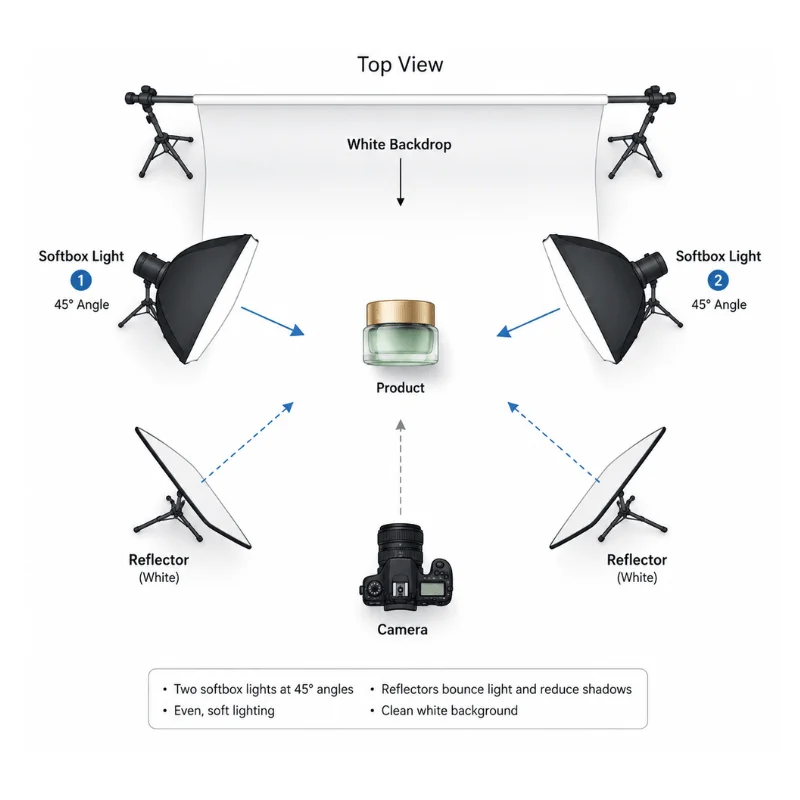
- Place one softbox or LED light on each side of the product at roughly 45-degree angles
- Keep lights at equal distance and power to create even illumination
- Add a reflector or white card opposite each light to bounce fill light and reduce shadows
- Aim for even, diffused light with no hotspots on the background
Background Lighting Tip
For a truly pure white background, light the backdrop separately from the product. Place one or two lights aimed directly at the white background behind the subject. This prevents the background from appearing gray or underexposed in camera and reduces the amount of editing needed in post-processing.
Step 3: Control Exposure Without Overexposing

Overexposure is one of the most common mistakes in white background product photography. When the background is too bright, it bleeds onto the product edges, washes out colors, and reduces detail.
To avoid this:
- Start with a low exposure setting and gradually increase it
- Use a grey card or histogram to confirm exposure accuracy
- Stop increasing brightness once the background appears pure white
- Make sure the product retains its natural color and edge details
A properly exposed white background in camera will save significant editing time and produce better results than fixing a blown-out image in post.
Step 4: Create a Sweep for an Infinite Background Effect
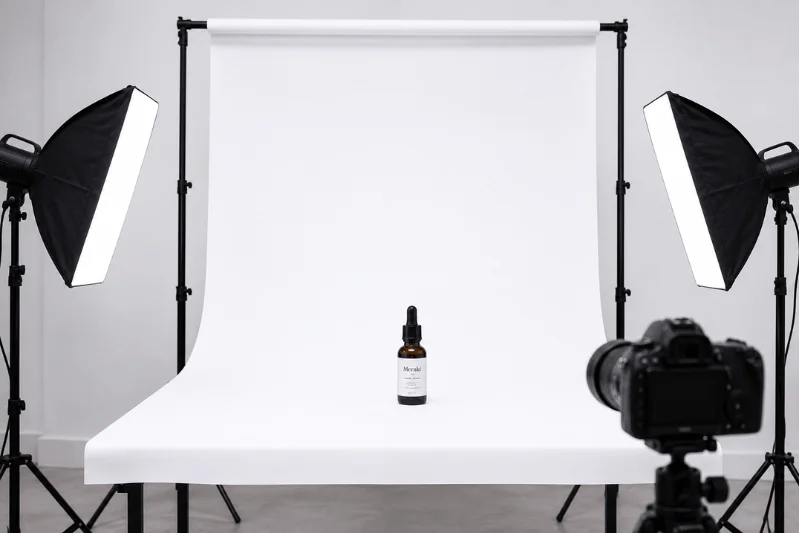
For a professional ecommerce look, create an infinite background, also known as a sweep. This eliminates the visible line where the backdrop meets the floor or table surface.
For small products, bend the white background smoothly from the wall to the table so there are no visible lines, and hold it in place with tape or clips. For larger products or clothing photography, spread the backdrop across the floor and keep it flat and wrinkle-free.
You can also place a clear plastic sheet under the product to create a soft reflection and give the photo a more professional look.
Step 5: Position the Product and Camera
Product placement and camera angle can affect the final image quality. Keep the product a few feet away from the background to reduce shadows. Shoot at eye level or slightly above for a natural look, and use a tripod to keep framing consistent across multiple shots. For reflective products like glass or metal, slightly change the angle to reduce unwanted reflections.
White Background Photography Outdoors
While studio setups offer full control, outdoor white background photography can produce excellent results under the right conditions.
- Shoot on a bright, cloudy day because the light looks softer and creates fewer shadows.
- Place the white background behind the product with the sun behind it.
- Use one or two reflectors to direct more light onto the product.
Keep in mind that outdoor lighting changes quickly. Consistent ecommerce product photography is best done in a controlled indoor setup where light remains constant across a full shoot.
Using a Lightbox for Small Product Photography

For very small products, a full ecommerce product photography setup may not always be necessary. A lightbox is an easy way to create white background product photos at home. It helps produce soft and even lighting for small products like jewelry, cosmetics, electronics, and accessories.
Most lightboxes come with built-in lights and a white background, making it easy to take professional product photos with a simple setup. They are great for sellers who photograph many small products regularly.
For a clean floor reflection, place a sheet of plexiglass or acrylic under the product inside the lightbox. This creates a natural floor reflection effect that adds realism without complicating the background.
Camera Settings for White Background Ecommerce Photography
Getting your camera settings right saves significant editing time. Wrong settings produce gray backgrounds, overexposed products, and blurry edges.
| Setting | Recommended Value | Why |
|---|---|---|
| ISO | 100 — 200 | Keeps the image clean without grain |
| Aperture | f/8 — f/11 | Sharp product, even background |
| Shutter Speed | 1/125 — 1/200 | Prevents motion blur |
Keep ISO low to avoid grain on the white background. Use f/8 to f/11 for a sharp, fully focused product. With natural light, slow the shutter to 1/60 and use a tripod to prevent camera shake.
Always shoot in RAW format. It gives you far more flexibility to correct exposure and background color in post-processing. Use manual focus to ensure the sharpest point of your product is perfectly in focus, as autofocus can struggle against a uniform white background.
Post-Processing: How to Add White Background to Photos
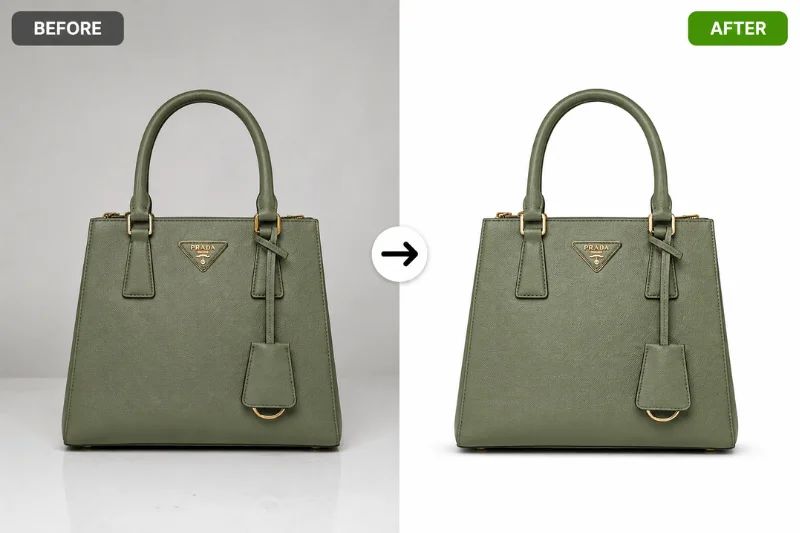
Even with good lighting and a proper studio setup, a professional white background photo edit is often needed to remove gray tones, uneven shadows, dust spots, and edge imperfections. This helps achieve a pure white (#ffffff) background that meets ecommerce marketplace requirements. Here is a quick overview of the main editing steps:
Dark Spot and Shadow Removal
Use the Spot Healing Brush Tool in Photoshop to remove imperfections, dust, and shadow edges from the white background. For complex subjects, use the Select and Mask workspace to refine edges cleanly.
White Background Replacement
If the background is still gray or off-white after shooting, you can add a pure white background in post-processing. Select the subject using the Quick Selection Tool or Pen Tool. After that, apply a Layer Mask to remove the original background. Then add a Solid Color layer set to #ffffff beneath the subject.
Color Correction
White backgrounds can shift product color if the lighting is too warm or cool. Use the Eyedropper Tool and color balance adjustments to ensure the product colors appear accurate and consistent across all images.
Common White Background Photography Mistakes to Avoid
| Mistake | How to Fix It |
|---|---|
| Gray or dull background | Add a light behind the product |
| White product disappears into background | Add a soft shadow or increase contrast |
| Harsh shadows on the background | Use balanced lighting and reflectors |
| Background too bright | Lower the background light |
| Wrinkles in the backdrop | Use smooth fabric or iron it first |
| Background looks off-white | Adjust it to pure white in Photoshop |
White Backdrop Photoshoot Ideas for Ecommerce
A clean white backdrop gives ecommerce sellers flexibility to create different product photography styles while maintaining a professional look. Here are some popular white backdrop photoshoot ideas used by online brands and marketplaces:
- Flat lay product photography for cosmetics, fashion accessories, and stationery
- Floating product shots created with invisible support and editing techniques
- Reflection photography using acrylic or plexiglass surfaces
- Lifestyle product shots with white backgrounds for a cleaner branded look
- Ghost mannequin photography for apparel and clothing ecommerce stores
- Minimal shadow photography for Amazon-style product listings
If you need consistent, marketplace-ready white background images at scale, Clipping World’s background removal and photo editing services ensure every product image meets platform requirements without the time and effort of in-house editing.
Frequently Asked Questions
The best camera settings for white background photography are ISO 100–200, aperture f/8–f/11, and a shutter speed adjusted to your lighting setup. These settings help maintain sharp product details while keeping the white background clean and evenly exposed.
Yes. Modern smartphones can capture high-quality white background product photos when combined with good lighting, a clean white backdrop, and stable positioning. Using a tripod and natural or LED lighting helps produce more professional ecommerce images.
Seamless white paper is the best backdrop material for professional product photography because it creates a smooth, wrinkle-free background. For white background photography at home, white foam board, fabric, or poster board also work well for smaller products.
Soft, diffused lighting works best for white background ecommerce photography because it reduces harsh shadows and creates even exposure. Most ecommerce photographers use two softboxes or LED lights positioned at 45-degree angles around the product.
Final Thoughts
White background photography is one of the best ways to make ecommerce product images look clean and professional. It helps products stand out, improves marketplace compliance, and can increase customer trust and sales.
Whether you are shooting at home or in a professional studio, the key factors are simple: good lighting, a clean white background, proper camera settings, and careful editing.
For businesses that need large numbers of product images, professional background removal and editing services can help save time while keeping image quality consistent.