

Batch photo editing for Amazon FBA sellers is a practical way to process multiple product images at once instead of editing them individually. It can be used to remove or replace backgrounds, resize images, adjust colors, and apply other basic edits across a batch. This approach helps sellers save time and keep product photos consistent across their Amazon listings.
What Is Batch Photo Editing for Amazon Listings
Batch photo editing is a workflow that allows multiple product images to be processed at once using saved presets and automated tools. Instead of opening, adjusting, and saving each image individually, editors can apply the same edits to an entire batch.
This is especially useful for sellers and editors who handle large product catalogs, as editing images one by one can be time-consuming and delay product launches. Batch editing helps keep product images consistent across Amazon listings while reducing repetitive manual work.
Batch Editing vs. Editing Photos One by One
Editing product photos one by one can take a lot of time, especially when you have a large catalog. Batch editing lets you apply the same adjustments to multiple images at once, making the workflow faster and more consistent.
| Factor | Batch Editing | Individual Editing |
|---|---|---|
| Time | Faster | Slower |
| Consistency | High | Can vary |
| Best for | Large batches | Small batches |
| Manual Work | Less | More |
For Amazon sellers managing multiple SKUs, batch editing can simplify repetitive tasks and keep product images consistent. Individual editing is still useful when a photo needs unique adjustments that cannot be handled with the same settings.
Why Amazon FBA Sellers Need Batch Photo Editing
Managing dozens of products or multiple color variations can make photo editing time-consuming. Batch editing helps sellers process multiple images at once, keep product photos consistent across SKUs, and prepare new listings more efficiently.
Save Time on Large Image Batches
Batch editing allows sellers to apply the same adjustments to multiple product images at once. This reduces the time spent repeating the same editing tasks for each image.
Keep Product Images Consistent
Using the same editing settings across a batch helps maintain consistent colors, sizing, and overall presentation across product listings.
Manage Multiple SKUs More Easily
Sellers with multiple products, sizes, or color variations can process images more efficiently by organizing and editing them in batches.
Speed Up New Product Listings
A streamlined batch editing workflow can help sellers prepare product images faster, making it easier to update existing listings or launch new products.
Overall, batch photo editing makes it easier for Amazon FBA sellers to manage large product catalogs while saving time and maintaining consistent image quality.
Amazon Product Image Requirements to Check Before Editing
Before batch editing Amazon product photos, sellers should review the image requirements for their product category. Amazon’s guidelines can vary by category, so checking the relevant requirements before editing helps avoid common image issues.
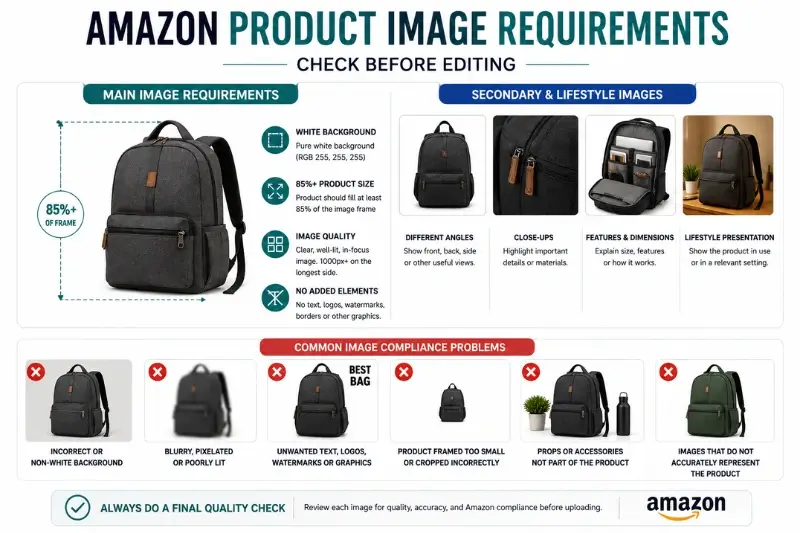
Main Image Requirements
The main image is the primary product photo shown to shoppers in Amazon search results. It should accurately represent the product and follow Amazon’s main image standards.
- White background: Use a pure white background (RGB 255, 255, 255).
- Product positioning: The product should fill at least 85% of the image frame.
- Image quality: Use a clear, well-lit, in-focus image. Amazon currently recommends at least 1,000 pixels on the longest side for zoom functionality.
- No added elements: Avoid text, logos, watermarks, borders, or other graphics that are not part of the product.
Secondary and Lifestyle Images
Additional images give sellers more flexibility to show the product from different perspectives and provide useful details. Amazon recommends using additional images to show different sides, product features, or the product in use.
- Different angles: Show front, back, side, or other useful views.
- Close-ups: Highlight important details, materials, or features.
- Features and Dimensions: Show product size, features, and usage.
- Lifestyle presentation: Show the product in use or in a relevant setting when appropriate.
Common Image Compliance Problems
Before uploading a batch of edited images, check for common issues that may affect image quality or compliance.
- Incorrect background on the main image
- Blurry, pixelated, or poorly lit photos
- Unwanted text, logos, watermarks, or graphics
- Product framed too small or cropped incorrectly
- Props or accessories that are not part of the product
- Images that do not accurately represent the product
A final quality check is important after batch editing. Some photos may still need individual adjustments before Amazon upload. Always review Amazon’s latest image requirements before uploading.
What Can You Batch Edit in Amazon Product Photos?
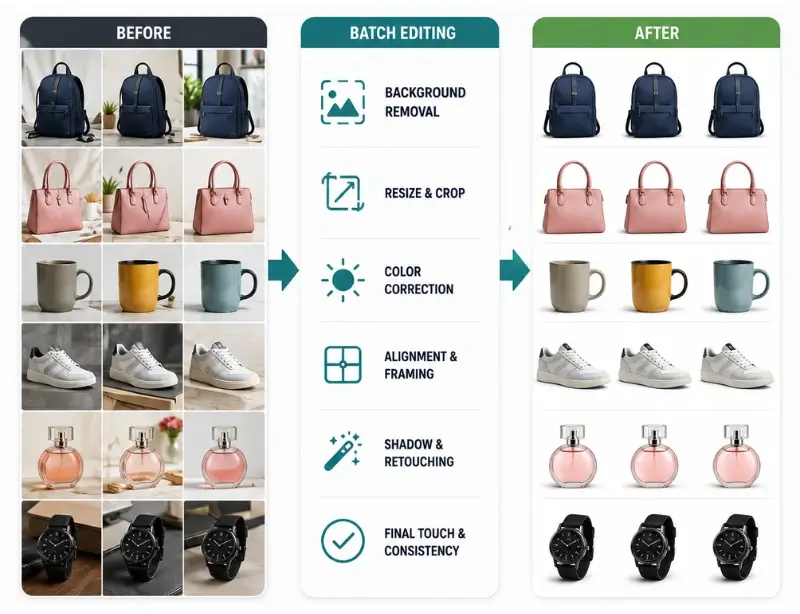
A good batch editing process can handle many repetitive tasks at once. Instead of adjusting each image individually, editors can set criteria for background removal, resizing, exposure correction, and other adjustments before processing the batch.
This helps maintain a consistent look across product images while reducing manual work. A well-organized workflow also makes it easier to process large numbers of images efficiently. Here are some of the most common edits to include in a batch editing process.
Background Removal and Replacement
For main product images, batch editing can remove distracting backgrounds and replace them with a clean white background. This is especially useful when many product photos need the same background treatment.
Resizing and Cropping
Batch processing can resize and crop multiple images to consistent dimensions. This helps maintain a uniform look across product listings and makes large image sets easier to prepare for upload.
Color and Exposure Correction
Color and exposure adjustments can be applied across a batch to improve consistency. Editors can correct common issues such as uneven brightness, color casts, or slightly dark images while keeping the product’s appearance accurate.
Product Alignment and Framing
Products can be positioned and scaled consistently across a batch. This helps prevent some images from appearing much larger or smaller than others and creates a more uniform presentation across SKUs.
Shadows and Basic Retouching
Simple shadow adjustments and basic retouching can also be included in a batch workflow when the same type of correction is needed across multiple images. However, complex images may still require individual editing.
Infographics and Branding for Secondary Images
Secondary images can include useful elements such as product dimensions, feature highlights, or other informational graphics. Batch editing can help apply consistent layouts or design elements across related images while keeping the main image requirements in mind.
Amazon recommends using additional images to show different angles, product features, or the product in use. The goal of batch editing is not to make every image identical. It is to handle repetitive tasks efficiently while maintaining accurate, consistent product presentation across the listing.
Step-by-Step Batch Editing Workflow
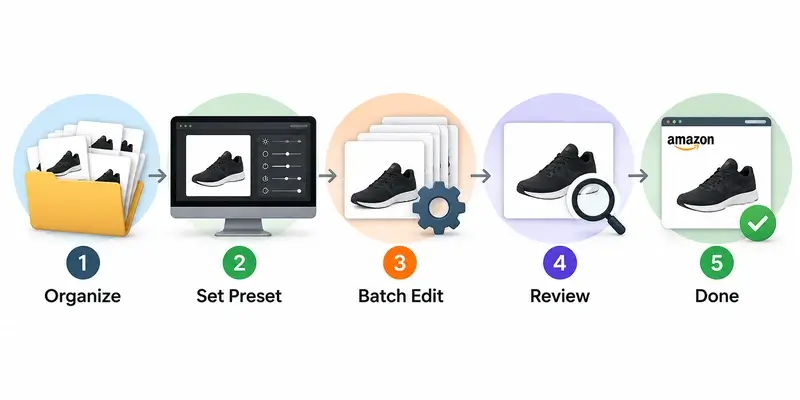
A well-organized workflow makes batch photo editing faster and helps reduce mistakes. Before processing a large batch, organize the files, set up the required editing settings, and review the final images before uploading them to Amazon.
1. Organize Images by SKU
Start by organizing your raw product photos into folders based on SKU, product type, or product variation. Keeping related images together makes it easier to process and review each product batch.
2. Set File Naming Rules
Give your files consistent names that include the SKU, product name, or image number. A clear naming system makes it easier to identify images, track edits, and prepare files for Amazon uploads.
3. Create Reusable Presets or Actions
Set up presets, templates, or Photoshop Actions for repetitive adjustments such as color correction, resizing, cropping, and exposure. Reusable settings can save time and help maintain consistency across the batch.
4. Process the Batch
Import the organized images into your chosen editing tool and apply the required settings to the batch. Review the workflow settings before processing to make sure the edits are appropriate for the product images.
5. Review and Correct the Edited Images
Do not rely entirely on automated batch processing. Check the edited images for problems such as inaccurate colors, rough background edges, incorrect framing, or other unwanted changes. Images that need special treatment can be edited individually.
6. Run a Final Quality Check
Before uploading the images to Amazon, check the final batch for image quality, dimensions, backgrounds, file names, and overall consistency. A final review helps catch errors that may have been missed during batch processing.
A consistent workflow makes it easier to handle large volumes of Amazon product images while reducing repetitive manual work and unnecessary editing errors.
Best Tools for Batch Editing Amazon Product Photos
Choosing the right batch photo editing tool depends on the size of your product catalog and the type of editing you need. Here are some popular tools for editing Amazon product images in bulk:
| Tool | Best For |
|---|---|
| Adobe Lightroom Classic | Color, exposure, and bulk adjustments |
| Adobe Photoshop | Advanced editing and Actions |
| Canva | Simple resizing and basic designs |
| BatchPhoto | Dedicated batch processing |
DIY Batch Editing vs. Outsourcing to a Service
The choice between DIY batch editing and outsourcing depends on your budget, editing skills, and the size of your product catalog. DIY editing gives you more control over the process, but it requires time to learn the tools and manage the editing workflow.
Outsourcing allows a professional photo editing service to handle the work, which can save time and make it easier to manage large volumes of product images.
| Factor | DIY | Outsourcing |
|---|---|---|
| Cost | Lower upfront cost | Pay per project |
| Time | More time needed | Saves time |
| Control | Full control | Less direct control |
| Skills | Requires editing skills | Professional expertise |
| Best for | Small batches | Large catalogs |
| Scalability | Limited | High |
When Should You Outsource Amazon Product Photo Editing?
As your Amazon store grows, managing product images can become more time-consuming. Hiring a professional editor can be a practical option when photo editing starts taking too much time or requires skills beyond your current workflow.
- Large Image Volumes: Editing hundreds of images manually takes time.
- Complex Editing: Detailed products may need specialized editing skills.
- Faster Launches: Outsourcing helps prepare images faster.
- More Business Time: Spend more time on important business tasks.
If you regularly process hundreds or thousands of Amazon product images, outsourcing batch photo editing can reduce repetitive work and help maintain consistent results across your catalog.
How to Choose a Batch Photo Editing Service
Choose a service based on quality, pricing, and delivery speed. Also check their Amazon experience and revision policy.
- Quality: Review sample work before ordering.
- Pricing: Compare bulk rates and editing costs.
- Turnaround: Check their delivery time.
- Experience: Choose editors familiar with Amazon images.
- Free Trial: Test quality before sending large batches.
Common Batch Photo Editing Mistakes to Avoid
Batch editing can save time, but applying the wrong settings across a large group of images can also create problems. Review each batch carefully and avoid these common mistakes.
Applying the Same Preset to Every Product
A preset that works well for one product may not work for another. Review the results and adjust settings when products have different colors, shapes, or lighting conditions.
Over-Sharpening
Too much sharpening can make product edges look harsh and unnatural. Use moderate sharpening and check the final images at their actual viewing size.
Incorrect Color Correction
Overcorrecting colors can make a product look different from its actual appearance. Adjust colors carefully and compare the edited image with the original when needed.
Poor Product Positioning
Inconsistent sizing or positioning can make a product catalog look unbalanced. Check that products are properly framed and positioned across the batch.
Skipping Manual Quality Checks
Batch processing does not always produce perfect results for every image. Review the final batch and manually correct images that need special treatment.
Uploading Without Checking Amazon Requirements
Before uploading, verify the final images against the relevant Amazon image requirements. Check backgrounds, dimensions, image quality, and any restricted elements.
Batch Photo Editing Checklist for Amazon FBA Sellers
Use this quick checklist before uploading your edited product images to Amazon:
- Images organized by SKU
- Correct background applied
- Image dimensions checked
- Product properly positioned
- Colors look accurate
- No unwanted text or elements
- Secondary images reviewed
- Final quality check completed
This final check can help catch editing errors before the images are uploaded to your Amazon listings. You can also use this ecommerce photo editing checklist before uploading your images.
Frequently Asked Questions
What Is Batch Photo Editing, And How Does It Work For Amazon Listings?
Batch photo editing is the process of applying the same or similar adjustments to multiple product images at once. Common edits include background removal, resizing, cropping, color correction, and exposure adjustments. This helps Amazon sellers save time and maintain consistency across product images.
How Many Product Images Should An Amazon Listing Have?
Amazon recommends providing multiple product images to help shoppers understand the product. The number of images you can use may vary by product category and listing. Additional images can show different angles, product features, close-ups, or the product in use.
What Image Size And Resolution Does Amazon Require For FBA Listings?
Amazon’s current image guidance allows product images from 500 to 10,000 pixels on the longest side. Images of 1,000 pixels or larger on the longest side are preferred for zoom functionality. For the main image, Amazon requires a pure white background (RGB 255, 255, 255), and the product should fill at least 85% of the image frame.
Can I Batch Edit Amazon Product Photos For Free?
Yes. Free tools such as GIMP and the free version of Canva can handle basic tasks such as resizing, cropping, and simple adjustments. However, more complex work, such as detailed background removal or advanced retouching, may require more specialized software or professional editing services.
Why Do Some Amazon Product Photos Get Rejected?
Product images may be rejected, removed, or cause listing issues when they do not meet Amazon’s image requirements. Common problems include an incorrect background on the main image, poor image quality, unwanted text or watermarks, incorrect product presentation, or insufficient image dimensions.
How Much Does It Cost To Batch Edit Product Photos For Amazon Fba?
The cost depends on the number of images, editing complexity, and service provider. Professional services may charge per image or project, with higher rates for complex editing such as detailed masking, retouching, or color matching.
Conclusion
Batch photo editing can help Amazon FBA sellers save time, maintain consistent product images, and manage large catalogs more efficiently. A well-organized workflow makes it easier to handle repetitive tasks such as background removal, resizing, color correction, and image adjustments.
While DIY editing can work well for smaller batches, outsourcing may be a practical option for larger catalogs or more complex editing needs. By combining an efficient editing process with a final quality check, sellers can prepare professional product images more efficiently and focus more time on growing their business.
Need Help With Bulk Amazon Images?
Processing hundreds of Amazon product images can take hours. Professional batch editing can reduce this repetitive workload. Get consistent product images without handling every edit yourself. Request a Free Trial and see how our editing service works.