
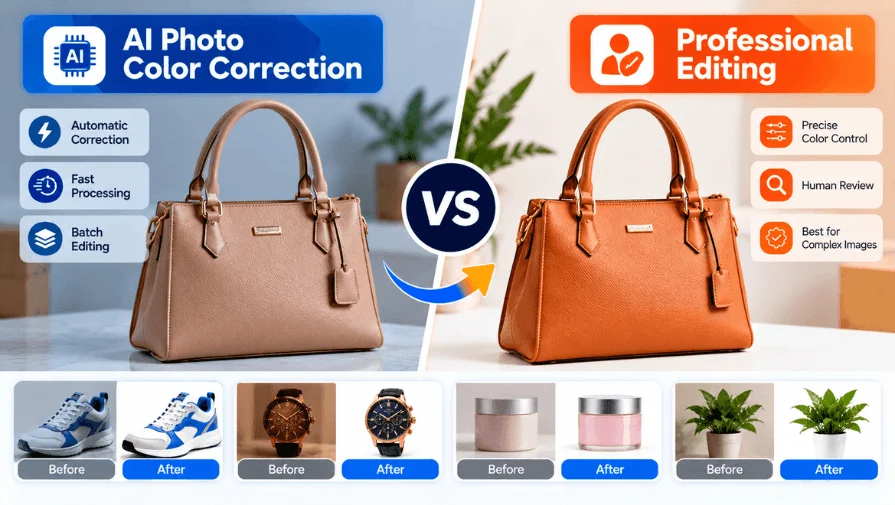
AI photo color correction makes image editing faster and easier. It can fix many common color problems automatically. These include white balance, exposure, contrast, and color casts.
Many AI tools now offer automatic color correction features. They can process large batches within a short time. This makes AI useful for simple and repetitive editing tasks.
However, AI does not handle every image perfectly. Complex lighting can require careful manual adjustments. Product colors may also need precise human control.
So, which option should you choose?
This guide compares AI color correction tools with professional editing. We will explore their features, strengths, and limitations. You will also learn which option fits different photo types.
Need color correction for your product photos? Get a quote from Clipping World.
Get A Quote →What Is AI Photo Color Correction?
AI photo color correction uses AI to improve image colors automatically. It identifies common color problems and applies suitable adjustments.
It can mainly help with:
- Color Balance: Corrects white balance and unwanted color casts.
- Image Tone: Adjusts exposure, contrast, and saturation.
- Skin Tones: Improves skin colors for more natural-looking portraits.
AI works well for many basic color corrections. Complex images may still need professional manual adjustments.
How Does AI Color Correction Work?
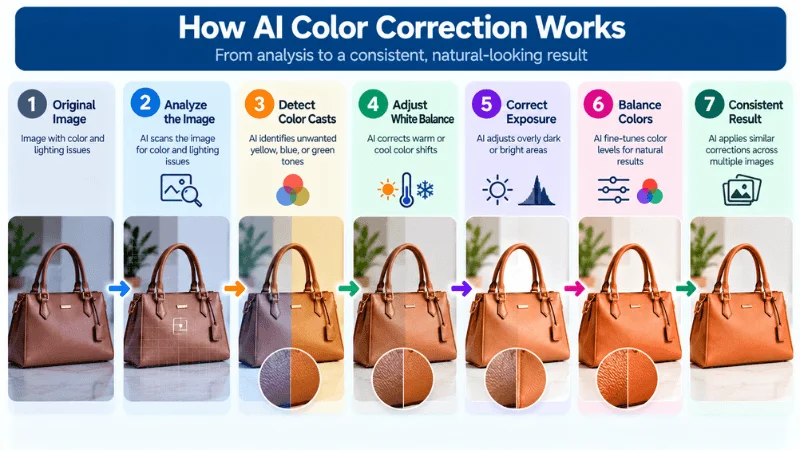
AI color correction follows several steps to improve image colors.
1. Analyze The Image
AI scans the image for color and lighting issues. It identifies areas that may need correction.
2. Detect Color Casts
AI identifies unwanted yellow, blue, or green tones. It detects color shifts caused by lighting conditions.
3. Adjust White Balance
AI corrects warm or cool color shifts. This helps create a more balanced color appearance.
4. Correct Exposure
AI analyzes image brightness and exposure levels. It adjusts overly dark or bright areas when possible.
5. Balance Colors
AI fine-tunes color levels across the image. This helps create more natural-looking color balance.
6. Improve Consistency
AI can apply similar corrections across multiple images. This helps maintain a more consistent visual appearance.
Popular AI Photo Color Correction Tools In 2026
AI color correction tools can save time on common editing tasks. They can adjust colors without complex manual editing. The right tool depends on your image type and workflow. Here are some popular options to consider in 2026.
AI Color Correction Tools At A Glance
| Tool | Best For | Batch Editing | Free / Price |
|---|---|---|---|
| Fotor | Beginners | Yes (paid plans) | Free plan; Pro from about $8.99/month |
| Evoto | Professional | Yes | Free trial; credit-based |
| CapCut | Quick fixes | Limited | Free plan; Pro about $19.99/month |
| Pixlr | Simple editing | Yes, up to 50 images | Free, ad-supported; from about $2.49/month |
| Cutout.pro | Automated editing | Yes (uses credits) | 5 free credits; from $5/month |
| YouCam | Portraits | Limited | Free with watermark; from about $6/month |
Prices were checked in September 2026 and may change. Check each tool’s website for current plans.
1. Fotor — For Quick Corrections
Fotor is a browser-based editor that pairs one-click AI enhancement with manual sliders for color, brightness, hue, and saturation. It works well for fast fixes on a handful of images. Batch editing is limited to paid plans.
2. Evoto — For Professional Workflows
Evoto’s AI Color Match copies the color style of a reference image onto your photos. It adjusts areas like skin, hair, and clothing separately instead of applying one flat filter. After matching one image, you can sync the same look across a whole batch. Pricing is credit-based, with a free trial. Expect a learning curve.
3. CapCut — For Fast Online Editing
CapCut is best known for video, but its editor also handles quick photo color and contrast fixes. That suits social media visuals and template-based creative work. The free plan includes AI color correction. Pro adds more advanced color controls, though prices vary by region.
4. Pixlr — For Simple Online Editing
Pixlr runs in the browser with two editors. Its AI tools lean toward generative fill, background removal, and upscaling, so use manual adjustments for precise color work. The free plan is ad-supported. Paid plans start at about $2.49 per month, and AI features use monthly credits.
Cutout.pro — For Automated Editing
Cutout.pro is mainly a background removal, retouching, and image enhancement tool. Color correction is a secondary use. It suits ecommerce sellers who need clean cutouts and quick enhancement in one place. It uses credits, so large batches may require more credits.
YouCam — For Portrait Editing
YouCam focuses on selfies, portraits, and beauty edits. Its AI tools enhance skin and overall portrait appearance. The free version includes a watermark and daily limits on AI edits. Premium starts at about $6 per month. It is less suited to complex commercial editing.
What Can AI Color Correction Fix?
AI photo color correction tools can solve many common photo problems. They are useful for quick fixes and automated workflows. Results still depend on the original image and lighting quality. Here is what AI color correction can fix:
Mixed Lighting Problems
Mixed lighting can create mismatched color tones. AI can analyze these areas and improve overall color balance. This helps the photo look more visually consistent.
Dull Or Lifeless Product Colors
Poor lighting can make product photos look flat. AI can improve vibrancy and restore clearer color separation. This can make ecommerce images look more polished.
Uneven Exposure
Some photos have overly bright or dark areas. AI can balance these tones and improve overall brightness. It can also improve detail visibility in problem areas.
Overly Strong Or Unnatural Colors
Oversaturated colors can make photos look unnatural. AI can reduce excessive saturation and balance intense colors. Check color-critical images against the real product.
Basic Skin Tone Shifts
Portraits can develop unwanted warm or cool tones. AI can balance these shifts for more natural-looking skin. Fine skin retouching goes beyond what one-click tools do.
Batch Color Differences
Photos from one session may have different color tones. AI can bring multiple images closer to a consistent appearance. This is useful for catalogs and large photo workflows.
Reference Color Matching
Some advanced AI tools support reference images. They can match the color appearance of one image to another. This helps maintain consistency across repeated photo projects.
Where AI Color Correction May Struggle
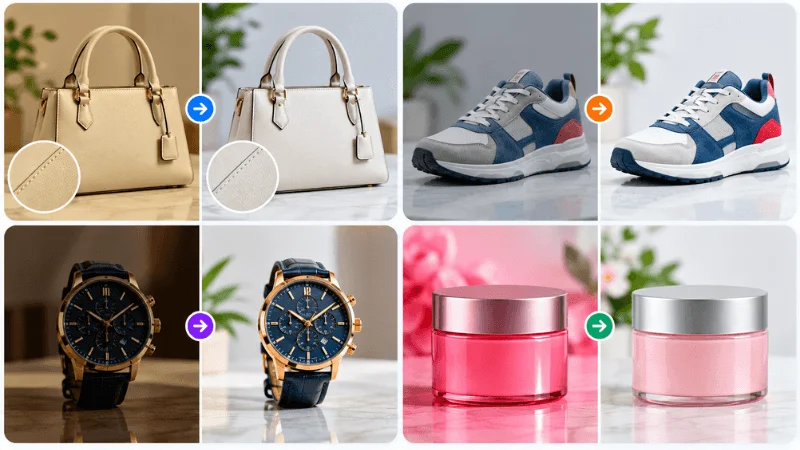
AI color correction can handle many common image problems. However, results can vary by image and tool. Some photos may need closer manual review.
Mixed Lighting
Mixed lighting can create different color conditions in one image. AI may produce different results across these areas. Manual adjustments can help improve difficult lighting situations.
Difficult Skin Tones
Skin tones can vary because of lighting and surroundings. AI may not always produce the desired skin tone. A retoucher can fine-tune skin tones region by region.
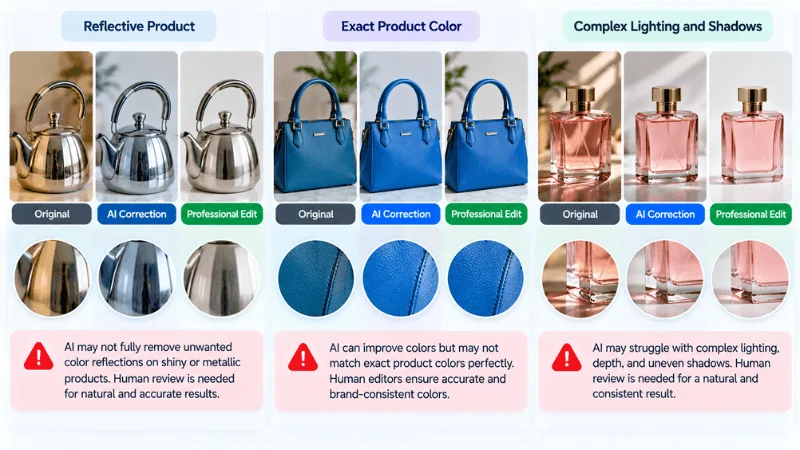
Reflective Products
Reflective surfaces can pick up surrounding colors and light. This can make color correction more challenging for AI. Manual editing may help control these unwanted color changes.
Exact Product Color Matching
Some products need highly accurate color representation. AI results may vary with the original image quality. Manual review can help maintain important product colors.
Brand-Specific Colors
Brands may use specific colors across product images. AI may not always match those colors precisely. Professional review can help maintain brand color consistency.
Complex Shadows
Strong shadows can affect how colors appear in an image. AI may interpret these areas differently across different photos. Manual adjustments can provide more control when needed.
Local Color Corrections
Some images need color changes in specific areas only. AI may apply adjustments more broadly than intended. Targeted manual editing can help control individual image areas.
Creative Color Decisions
Not every color adjustment has one correct result. Creative projects may require a specific visual direction. Human editors can make decisions based on the intended outcome.
AI Color Correction vs Professional Editors
AI tools and professional editors approach color correction differently. The main differences involve speed, control, consistency, and judgment.
| Factor | AI Tools | Professional Editors |
|---|---|---|
| Speed | Very Fast | Depends On Workload |
| Basic Corrections | Common Issues | Manual Control |
| Batch Editing | Fast and Consistent | Scalable With Workflow |
| White Balance | Automated | Manual Control |
| Skin Tone Control | Tool Dependent | Detailed Adjustment |
| Product Color Accuracy | Results Can Vary | Precise Manual Control |
| Complex Images | May Need Manual Review | Manual Adjustment Available |
| Creative Control | Tool-Dependent | High |
| Human Judgment | Not Available | Included |
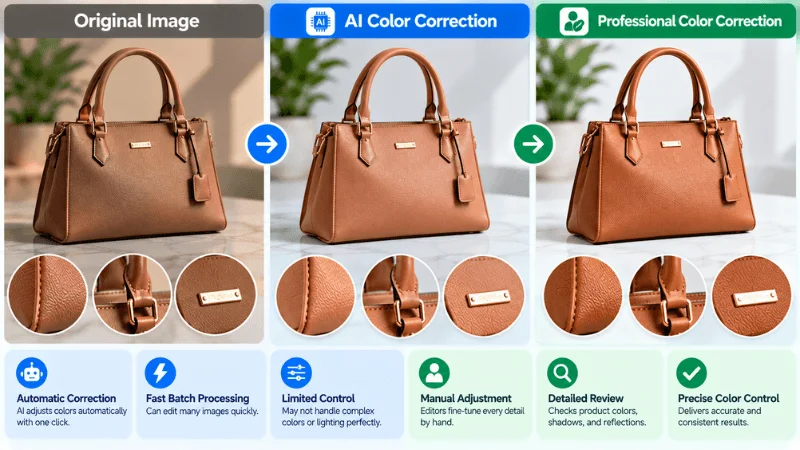
AI can reduce time on simple and repetitive corrections. Professional editors can review details and make targeted adjustments. The better option depends on image complexity and accuracy needs.
AI vs Professional Color Correction: Which Should You Use?
The right option depends on your image and editing requirements. Consider image complexity, volume, accuracy, and required control.
Choose AI When:
- You need fast corrections.
- Images have simple color problems.
- You have many similar photos.
- You need a first-pass correction.
- You want to reduce repetitive manual work.
Choose Professional Editing When:
- Product color accuracy matters.
- Lighting conditions are difficult.
- Skin tones need careful handling.
- Images need detailed adjustments.
- Brand colors must remain consistent.
- Creative color decisions require human judgment.
Use A Hybrid Workflow When:
- AI handles repetitive corrections.
- A professional reviews important images.
- Large batches need quality control.
- Critical images need detailed adjustments.
A hybrid workflow can combine automated corrections with human review. This approach can suit workflows with both volume and accuracy needs.
AI Color Correction For Ecommerce Product Photos
Ecommerce photos need consistent and accurate colors. Color differences can affect how customers view products. AI can help correct common color issues quickly.
Product Color Accuracy
Product colors should look close to the real item. AI can correct common lighting and color problems. However, color-critical products may need manual review. For more details, see our guide to ecommerce product color accuracy.
Clothing Colors
Clothing photos can show unwanted warm or cool tones. AI can help balance these colors across product images. Manual review may still be useful for exact color matching.
Jewelry Colors
Jewelry can reflect surrounding light and nearby colors. This can affect how metals and gemstones appear. AI may help balance these tones, but results can vary.
White-Background Products
White backgrounds can sometimes appear yellow, blue, or gray. AI can help create a more balanced background appearance. Product edges and shadows may still need careful review.
Brand Colors
Brands often use specific colors across product images. AI can help create more consistent color appearance. Important brand colors should be checked before publishing.
Multiple Product Images
Online stores often show several images for one product. Different lighting can make these images look inconsistent. AI can help bring their color appearance closer together.
Consistent Catalog Colors
Large catalogs may contain hundreds of product images. AI can reduce repetitive color correction work across these images. Quality checks can help maintain consistency throughout the catalog.
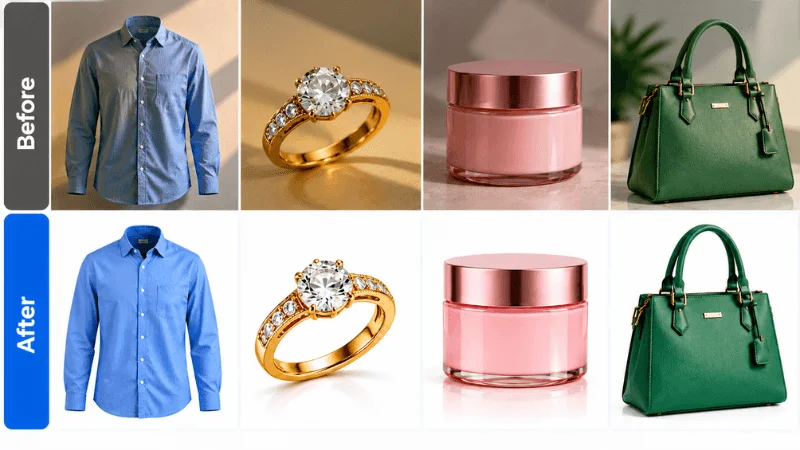
For color accuracy requirements, human review can still add value. This is especially important for products where color affects buying decisions.
Cost of AI vs. Professional Color Correction
AI color correction can have a lower upfront cost. Many tools use subscriptions or pay-per-use plans. Professional editing usually charges based on image requirements.
AI Color Correction Cost
AI tools usually charge through subscriptions or credits. The final cost depends on the tool and plan. High-volume editing may require higher plans or credits.
Professional Color Correction Cost
Professional color correction usually costs per image. Pricing depends on image complexity and editing requirements. Clipping World offers color correction starting at $0.30 per image. Bulk orders may also qualify for discounts. Final photo color correction pricing can vary by project requirements.
AI vs Professional Cost
| Cost Factor | AI Tools | Professional Editing |
|---|---|---|
| Pricing Model | Subscription Or Credits | Usually Per Image |
| Basic Editing Cost | Often Lower | Depends On Complexity |
| Large Orders | May Require Higher Plans | Bulk Pricing May Apply |
| Extra Review | Usually Manual | Included In The Workflow |
| Complex Images | May Need Additional Editing | Priced Based On Complexity |
| Overall Cost | Depends On Usage | Depends On Volume |
AI can reduce costs for simple editing tasks. Professional editing adds human review and detailed control. The right choice depends on accuracy, volume, and workflow.
Why Ecommerce Brands Use Professional Color Correction
Ecommerce brands often manage large product image catalogs. Consistent color quality becomes important across these images.
Large Product Catalogs
Large stores may process hundreds or thousands of images. Professional ecommerce editing services like Clipping World handle color correction at this scale. This helps maintain a similar look across product listings.
Color-Sensitive Products
Some products need closer color control than others. This includes clothing, cosmetics, jewelry, and branded products. Small color differences can change how products appear online. Jewelry brands can also benefit from professional jewelry photo editing.
Detailed Color Requirements
Some images need more than basic color correction. Editors can make targeted adjustments for specific image areas. This provides more control over the final appearance.
Quality Review
Professional workflows can include human quality checks. Editors can review important images before final delivery. This helps identify color issues that need further adjustment.
Bulk Editing Workflows
Professional editing services can handle recurring image orders. Teams can send new product batches to a provider like Clipping World instead of editing in-house. This helps manage large workloads and reduces repetitive editing work for internal teams.
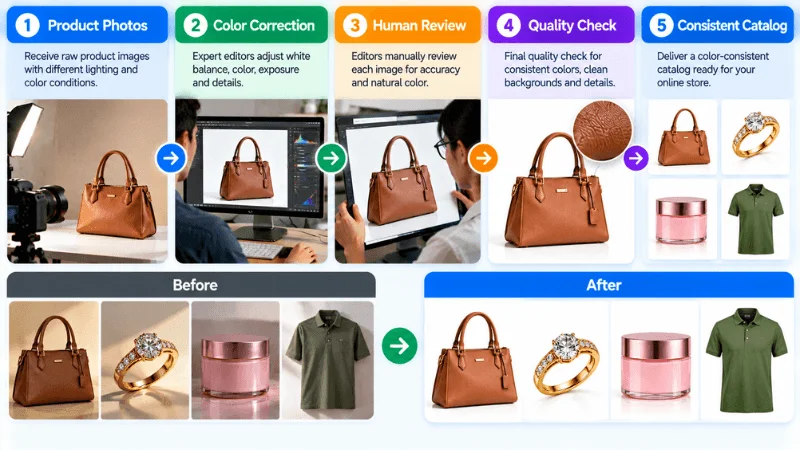
For ecommerce brands, the right workflow depends on image volume. Accuracy requirements and product types also matter.
Need professional color correction for your product images? Start your free trial today.
Start Free Trial →AI Color Correction For Portraits
Portrait photos often need careful color and lighting adjustments. AI can help correct common color issues quickly. Results can vary with lighting, skin tone, and image quality.
Skin Tones
AI can help balance unwanted warm or cool skin tones. It can improve skin color while preserving the overall image. Detailed portraits may still need manual adjustments.
Indoor Lighting
Indoor lights can create unwanted yellow or orange tones. AI can help correct these shifts automatically. Results may vary with different lighting sources.
Outdoor Lighting
Outdoor light can change throughout a photo session. This can create different color tones across portraits. AI can help make these tones more consistent.
White Balance
Incorrect white balance can affect the entire portrait. AI can adjust warm or cool color shifts. This helps create a more balanced overall appearance.
Face Consistency
Multiple portraits may show different color tones. AI can help bring these images closer together. This is useful for portrait batches and photo sessions.
Natural-Looking Results
AI adjustments should preserve a realistic portrait appearance. Excessive correction can make skin look unnatural. A quick visual check keeps results subtle.
Can AI Replace Professional Color Correction?
AI can replace some basic color correction tasks, but not every professional editing workflow. Complex lighting, precise product colors, and detailed adjustments may still need human review.
AI + Professional Editing Workflow
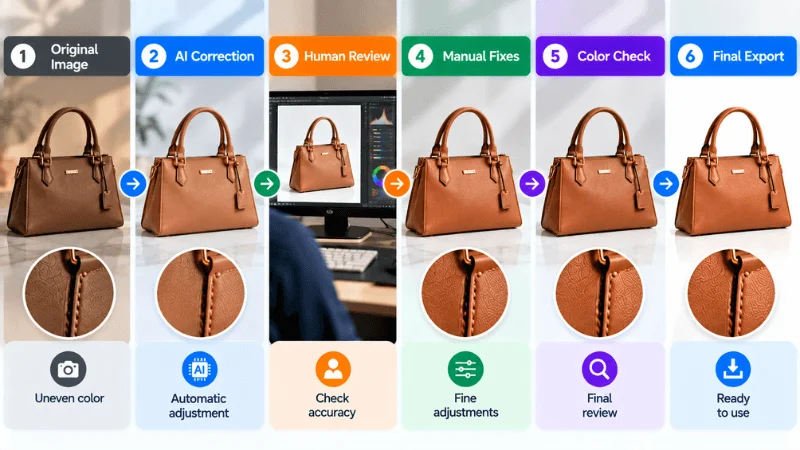
A hybrid workflow combines AI automation with human review.
Original Image → AI Correction → Human Review → Manual Fixes → Color Check → Final Export
AI handles common corrections and repetitive adjustments first. A professional then reviews important images for accuracy. Manual fixes address colors or details needing closer attention. The final color check helps maintain consistent results.
Frequently Asked Questions
What Is AI Photo Color Correction?
AI photo color correction uses AI to adjust photo colors automatically. It can improve white balance, exposure, contrast, and color tones.
Which AI Color Correction Tool Should You Use?
The right tool depends on your editing needs. Popular options include Fotor, Evoto, CapCut, and Pixlr.
Can AI Automatically Correct Photo Colors?
Yes, AI can automatically correct many common color problems. It can adjust white balance, exposure, contrast, and saturation.
Is AI Color Correction Good For Ecommerce?
AI can help correct common ecommerce photo color problems. Color-critical products may still need professional color review.
Can AI Replace A Professional Photo Editor?
AI can handle many basic and repetitive color corrections. Professional editors provide more control for complex images.
Final Takeaway
AI photo color correction makes many editing tasks faster. It works well for simple and repetitive corrections. Professional editing provides deeper control and human review.
The right choice depends on your image and workflow. Consider image complexity, color accuracy, volume, and editing goals. For critical images, a professional review may add value.