
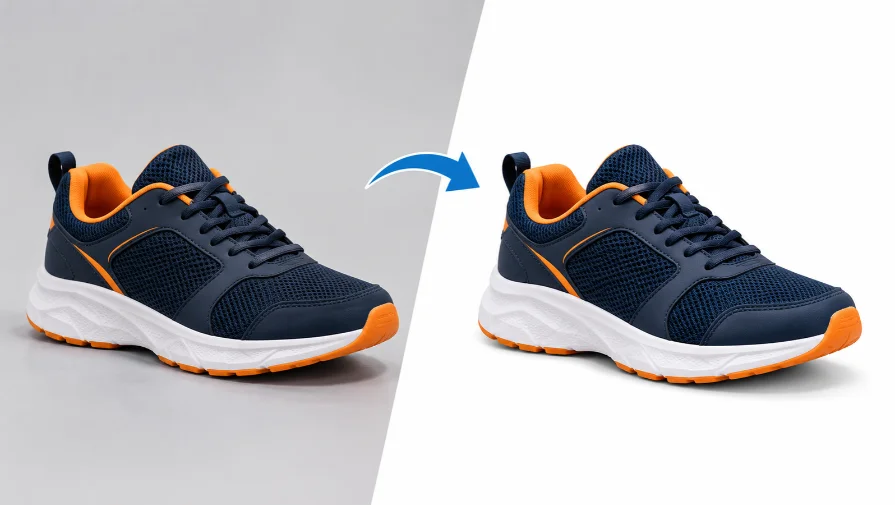
Choosing the right background removal service can improve your e-commerce product images, save editing time, and help maintain a consistent catalog. AI tools work well for simple images, but complex edges, transparent products, and intricate product details often require manual background removal service. Compare edge accuracy, pricing, turnaround time, output quality, and data security before choosing a provider.
1. AI Background Removal vs. Professional Services

The best choice between AI tools and professional background removal services depends on your product types, budget, and quality expectations. AI can process simple images in seconds, making them useful for businesses that need quick results. However, complex products such as jewelry, clothing, glassware, and items with fine edges may require manual background removal for a more accurate result.
Professional background removal services offer greater control over image details. Skilled editors can create precise clipping paths, preserve fine edges, and handle transparent or reflective products more carefully. Although manual editing may take longer than automated processing, it can be a better option for high-quality product catalogs and images that require consistent results.
| Comparison Factor | AI Background Removal | Professional Services |
|---|---|---|
| Processing Speed | Removes backgrounds in seconds for many simple images. | Takes longer because editors manually process and review images. |
| Edge Accuracy | Works well with clear product edges but may miss fine details. | Editors can carefully preserve edges around fur, lace, hair, and intricate products. |
| Complex Products | May struggle with glass, transparent objects, and reflective jewelry. | Editors can use advanced masking and clipping techniques to handle complex products. |
| Image Consistency | Results can vary depending on lighting, background, and product shape. | Editors can follow consistent guidelines across an entire product catalog. |
| Cost | Often affordable for frequent, simple background removal tasks. | Usually costs more per image, depending on complexity and order quantity. |
| Customization | Offers limited control depending on the tool’s features. | Supports custom clipping paths, transparent backgrounds, and natural-looking shadows. |
| Best For | Small businesses, simple products, and quick image processing. | E-commerce brands, photography studios, and businesses that need precise, consistent results. |
2. Key Quality Factors to Evaluate

Before choosing a background removal service, evaluate the quality of its editing results. Clean edges, realistic shadows, accurate colors, and high-resolution output help product images look professional across e-commerce platforms. Request sample edits to check whether the service can meet your quality expectations.
Edge Accuracy for Hair, Fur, and Lace
Edge accuracy determines how cleanly a product is separated from its original background. Fine details such as hair strands, animal fur, lace, and fabric threads can be difficult to isolate without losing important parts of the subject. Choose a service that avoids rough outlines, unwanted halos, and missing details, especially when editing clothing, accessories, or detailed product photos.
Editing Transparent Objects and Adding Custom Shadows
Transparent and reflective products, such as glass bottles, crystal items, and jewelry, require careful background removal. These products may contain reflections, highlights, and transparent areas that can disappear or look unnatural during editing.
A skilled photo editor can preserve these visual details while removing the unwanted background. Custom drop shadows can also add depth and make products appear more realistic instead of looking like they are floating on the page.
Output Resolution and Color Accuracy
Image resolution and color accuracy are important for maintaining professional product photos. A background removal service should provide images at the required dimensions without unnecessary resizing or compression that reduces clarity.
Color profile retention also helps preserve the product’s original colors, which is particularly important for clothing, cosmetics, and jewelry. Before ordering, confirm the available file formats, output resolution, and color handling to ensure the final images meet your website and marketplace requirements.
3. Pricing Models and Turnaround Times
When choosing a background removal service, compare pricing and delivery speed to find an option that fits your business needs. Some providers charge per image, while others offer monthly subscriptions or discounts for bulk orders. The total cost often depends on image complexity, order quantity, and the level of editing required.
Turnaround time is equally important, especially for e-commerce businesses managing large product catalogs or preparing for seasonal promotions. Standard delivery is suitable for routine projects, while rush processing can help meet tight deadlines, usually at an additional cost. Before placing a large order, request a quote, confirm the delivery schedule, and check whether revisions are included in the price.
Pay-Per-Image Credits vs. Fixed Monthly Subscriptions
Background removal services offer pay-per-image credits or monthly subscriptions. Pay-per-image plans suit occasional needs, while subscriptions may offer better value for regular editing. Compare pricing, image limits, and included features before choosing.
| Feature | Pay-per-Image Credits | Fixed Monthly Subscriptions |
|---|---|---|
| Pricing | Pay for credits or images as needed. | Pay a recurring monthly fee. |
| Best For | Small businesses with occasional editing needs. | Businesses with regular image editing requirements. |
| Monthly Usage | Flexible, depending on available credits. | May include a fixed number of images or usage limits. |
| Budget Control | Costs depend on how many images you process. | Provides a more predictable monthly expense. |
| Bulk Editing | Suitable for small or occasional batches. | Can be cost-effective for consistent, high-volume work. |
| Unused Credits | Expiration and rollover rules depend on the provider. | Unused image allowances may expire or reset each month. |
| What to Check | Credit costs, expiration dates, and extra charges. | Image limits, cancellation terms, and additional usage fees. |
Standard studio delivery windows vs. expedited rush processing
Background removal services offer standard and rush delivery options. Standard delivery suits routine projects, while rush processing helps meet urgent deadlines. Turnaround times depend on image complexity, order volume, and provider capacity.
| Feature | Standard Delivery | Expedited Rush Processing |
|---|---|---|
| Turnaround Time | Follows the provider’s regular delivery schedule. | Prioritizes urgent orders for faster delivery. |
| Best For | Routine product photos and planned catalog updates. | Urgent launches, promotions, and last-minute projects. |
| Pricing | Usually follows standard service rates. | May include additional rush fees. |
| Image Complexity | Suitable for both simple and complex images, depending on the deadline. | Complex images may still require extra processing time. |
| Bulk Orders | Works well for planned, high-volume projects. | Availability may depend on order size and team capacity. |
| Planning | Allows more time for quality checks and revisions. | Requires clear instructions and quick feedback to meet deadlines. |
4. Workflow Integration and E-Commerce Platform Requirements
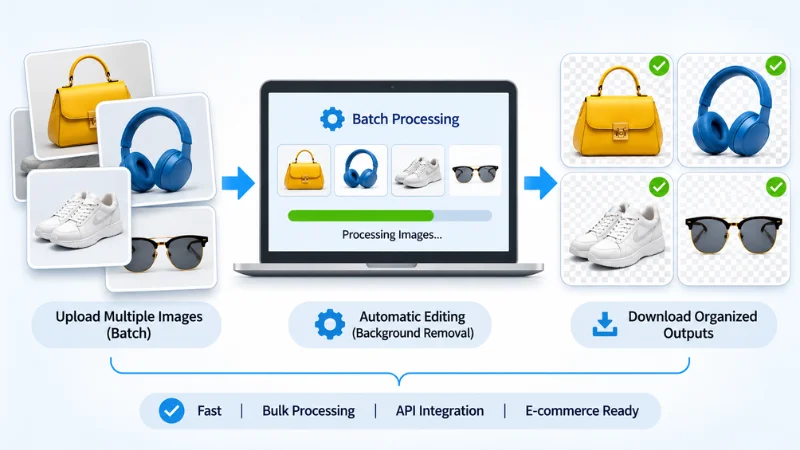
A good background removal service should fit into your existing e-commerce workflow and deliver images that meet your store’s requirements. Before choosing a background removal service provider, check whether it supports your preferred file formats, background styles, and quality standards. These details help ensure that edited images are ready for your website and online marketplaces.
| Feature | What to Check | Why It Matters |
|---|---|---|
| File Formats | Does the service support JPEG, PNG, and WebP? | Ensures compatibility with your website and workflow. |
| Image Dimensions | Can you request specific image sizes and resolutions? | Maintains consistent product listings. |
| Background Options | Can it provide white, transparent, or custom backgrounds? | Meets different product presentation requirements. |
| File Naming | Can edited images retain clear names or product identifiers? | Makes it easier to organize and match product photos. |
| Quality Control | Are images reviewed before delivery? | Helps identify rough edges, unwanted shadows, and editing errors. |
Batch Processing Through Web Apps and APIs
If your business handles large numbers of product photos, batch processing can make background removal more efficient. Some providers let you upload multiple images through a web app, while others offer API integration to connect image editing with your existing systems.
Web apps are usually easier to manage without technical knowledge. API integration is more suitable for businesses that want to automate image processing within their own websites or applications. Consider your order volume, technical resources, and workflow before choosing between these options.
| Feature | Web Apps | API Integration |
|---|---|---|
| How It Works | Upload images through a website or dashboard. | Connect the service to your website, software, or existing workflow. |
| Best For | Small businesses and teams that prefer a simple interface. | Large stores and businesses with regular image processing needs. |
| Image Processing | Upload and edit multiple images, depending on file limits. | Automate image processing through supported API requests. |
| Automation | Usually requires manual uploads and file management. | Can automate repetitive processing tasks once configured. |
| Setup | Generally easy to use with minimal technical knowledge. | May require developer support and API configuration. |
| Cost | May use subscriptions, credits, or pay-per-image pricing. | May charge based on API usage, credits, or subscription plans. |
Meeting White Background Requirements for Amazon, eBay, and Shopify

E-commerce platforms have different product image requirements, and these can vary by category and image placement. Amazon generally requires a pure white background for main product images. eBay requirements depend on its listing policies, while Shopify gives merchants more flexibility in how they display products.
Choose a background removal service that can deliver the appropriate background, image dimensions, and file format for each platform. Before uploading your edited images, check the latest marketplace guidelines to avoid listing issues or image rejections.
5. Operational Security and Commercial Image Licensing
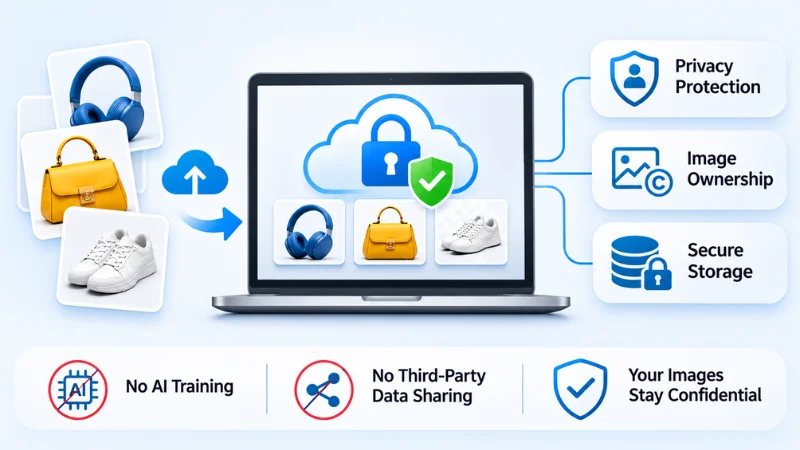
Image security and commercial usage rights are important when choosing a background removal service. E-commerce product photos may include unreleased designs, branded products, or confidential business information. Before selecting a provider, review its data protection policies and service terms to understand how your images are handled and how you can use the edited files.
Image Privacy, Data Storage, and Processing Location
Before uploading product photos, check how the provider stores and protects your files. Review its privacy policy to understand who can access your images, how long they are retained, and when they are deleted. Also, check whether you can request permanent deletion after project completion and whether backup copies are covered by the same policy.
If you work with clients who require US-based production or support, confirm where the editing team and data processing operations are located. Do not assume that a company’s US address means all image processing takes place in the United States.
Image Ownership, AI Training, and Third-Party Data Sharing
Check how the provider uses your original images and edited files. The following points can help protect your intellectual property and commercial rights:
- AI Model Training: Find out whether the provider uses uploaded images to train or improve its AI models. If your product photos are confidential or unreleased, look for clear restrictions on this use.
- Third-Party Data Sharing: Check whether your images are shared with external editors, subcontractors, or other service providers. Review the privacy policy to understand the conditions under which third parties can access your files.
- Ownership of Edited Images: Confirm whether you retain ownership of your original images and edited outputs. Review the service agreement for any restrictions on commercial use, distribution, or modification.
A reliable provider should explain these terms clearly. Understanding them before placing an order can help prevent unexpected restrictions on your product images and their commercial use.
Free Trials and Sample Image Testing
A free trial or paid sample can help you evaluate a service before committing to a large order. Submit a few representative images, including simple products and difficult examples such as hair, glass, or jewelry. Compare edge quality, color accuracy, turnaround time, and the consistency of the final files.
Testing sample images first helps you determine whether the provider can meet your quality expectations and handle your regular editing requirements.
Frequently Asked Questions (FAQs)
Which File Formats are Best for Transparent Backgrounds?
PNG is a common choice because it supports transparency and is widely compatible with e-commerce workflows. WebP can also support transparency where the platform and workflow allow it. Choose the format based on the requirements of your marketplace, website, or image management system.
Why Does AI Background Removal Fail on Hair or Jewelry?
Hair contains fine strands, while jewelry often has reflective surfaces, tiny details, and transparent or semi-transparent elements. AI tools may confuse these details with the background, causing rough edges or missing parts. Manual masking and clipping path work can help correct these problems.
What is the Turnaround Time for Bulk Image Editing?
Turnaround time depends on the number of images, their complexity, and the provider’s capacity. Simple images may be processed quickly, while detailed jewelry, clothing, or hair images can take longer. Ask for a delivery estimate based on a sample batch before placing a large order.
How Much Does a Professional Background Removal Service Cost?
Pricing depends on image complexity, order volume, editing requirements, and delivery speed. Simple background removal usually costs less than detailed clipping paths, transparent object editing, or custom shadows. Request a quote based on sample images so you can compare the real cost and quality of different providers.
Conclusion
The right background removal service should match your image quality needs, budget, order volume, and delivery schedule. Test a sample batch before committing, and check edge accuracy, file quality, marketplace compliance, and data security. For large e-commerce catalogs or complex product images, a professional service can help maintain a consistent look across your listings.
Need Professional Background Removal for Your Product Images?
Give your product photos a clean, consistent, and professional look with Clipping World’s background removal service. Our expert editors handle everything from simple cutouts to complex edges and detailed products. Get a Quote and let us help you prepare marketplace-ready product images.