

Poor jewelry photos can cost you sales. Buyers may leave if they cannot see the true color of gold, the sparkle of gemstones, or the fine details of a chain. Jewelry photo editing for Etsy & Shopify helps solve these problems.
Clean backgrounds, accurate metal tones, controlled reflections, and sharp details make your products look professional while preserving their real appearance. This guide covers practical editing techniques, marketplace requirements, DIY methods, and when to outsource jewelry photo editing.
Why Jewelry Photos Are Harder to Edit Than Other Product Photos
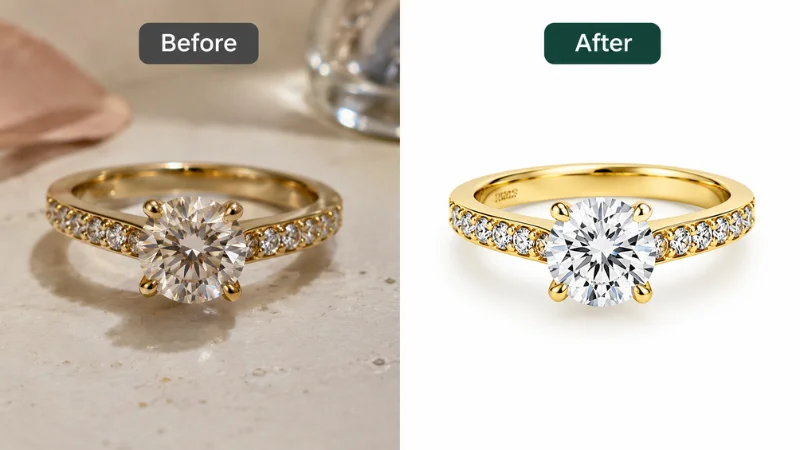
Jewelry demands more precision than most product editing. Gold, silver, diamonds, and gemstones all reflect light differently. One small mistake can change how a piece looks or hide a key detail. You need to balance visual appeal with an accurate product.
Reflections, Metal Color Accuracy, and Gemstone Sparkle
Polished metal picks up reflections from nearby objects, lights, and colors. These create distracting highlights and hide detail. Poor white balance turns yellow gold orange and makes silver look blue.
Gemstones add another challenge. Too much brightness, contrast, or sharpening makes diamonds and colored stones look fake. Good editing controls reflections while keeping true metal tones, stone color, and natural sparkle.
Thin Chains, Clasps, and Fine Details That Challenge AI Tools
Delicate chains, tiny clasps, small prongs, and intricate settings need precise edge work. Automatic background removal can erase thin links, distort small parts, or leave rough edges.
These errors make a product image inaccurate. Zoom in and review fine details after every edit, especially on intricate or high-value pieces. Manual refinement keeps the original shape and construction intact.
Etsy vs Shopify: Image Requirements Side-by-Side
Both platforms reward clear, high-quality images, but they present them differently. Etsy images compete in marketplace search results and must represent the actual item. Shopify gives you control over your storefront, so consistent dimensions and styling matter most.
| Factor | Etsy | Shopify |
|---|---|---|
| Image size | At least 2,000 px wide and tall (first photo at least 635 px) | 2,048 x 2,048 px is a useful square target |
| Image format | JPG, PNG, or HEIC. Animated GIFs and transparent PNGs are not supported | PNG, JPEG, WebP, and other supported formats |
| Main image | Clear, well-lit, and an accurate view of the actual item | Clear, high-quality, and consistent with the store’s style |
| Background | Presents the item accurately and follows Etsy’s image policy | White, neutral, or lifestyle backgrounds that suit the store |
| Image consistency | Clear presentation across listing photos | Matching aspect ratios and styling across product and collection images |
| Editing priority | Accurate representation and compliance with listing rules | Product clarity and visual consistency |
These are practical recommendations, not identical technical rules. Check the latest official documentation before uploading, because formats and policies change.
What Etsy Buyers Expect: Accurate Photos and Useful Details
Etsy buyers need to understand a piece’s design, size, color, and craftsmanship before they buy. Show multiple angles, close-ups of key details, and lifestyle photos that show the jewelry worn.
Color accuracy matters. Yellow gold should keep its natural warmth, silver should look neutral, and gemstones should show their real colors. Never edit out defects, change the design, or exaggerate sparkle.
Follow Etsy’s Listing Image Policy
Etsy’s image rules include showing the actual item. Etsy requires at least one unedited photo of the actual item against a real background, with some exceptions depending on the items you sell. Review Etsy’s current policy before you publish edited images.
You can improve lighting, correct color, and clean up backgrounds in your other photos. Every edit must still represent what the buyer will receive.
If you use AI to edit listing photos, follow Etsy’s current disclosure guidance. Always include the required unedited photo and ensure every edited image accurately represents the actual product.
What Shopify Stores Need: Clean Catalog Consistency
On Shopify, you control how images appear across your site. Mixed backgrounds, lighting, and image sizes make product pages look uneven.
Use one editing style across your catalog. Keep colors accurate and products well positioned. Add close-ups and lifestyle photos for detail. Consistent images help customers browse and compare pieces.
Do Jewelry Photos Need a White Background for Google Shopping?
Many Shopify stores also sync products to Google Merchant Center. That adds a few image rules on top of your store design.
Shopify itself does not require a white background. Google does not demand pure white either. But it flags images with distracting elements, such as watermarks or dark backgrounds. Low-quality images can keep a product from showing in ads and free listings.
Follow these basics for your main image:
- Use a clean white, light gray, or neutral background.
- Keep the jewelry sharp, centered, and fully visible.
- Aim for a resolution of at least 1,500 × 1,500 px.
- Let the product fill approximately 75%–90% of the frame.
- Remove watermarks and promotional text.
Guidelines change, so check Google’s latest image requirements before you upload a feed.
The Essential Jewelry Photo Editing for Etsy & Shopify Checklist
Before you publish Shopify jewelry product photos or Etsy listing images, review each image for accuracy, consistency, and presentation. Follow these seven steps to edit jewelry photos for Etsy and Shopify:
- Background: Remove distractions and create a clean background.
- Color Accuracy: Preserve natural metal and gemstone colors.
- Fine Details: Keep chains, clasps, prongs, and settings sharp.
- Dust & Marks: Remove dust and fingerprints while preserving texture.
- Shine & Reflections: Enhance natural sparkle and control harsh reflections.
- Shadows: Add soft shadows for depth when needed.
- Final Check: Compare with the original and verify dimensions and format.
Check every image before uploading, especially when editing large batches. Small inconsistencies can make a product catalog look uneven.
Background Cleanup for Jewelry Photos
- Remove clutter, marks, and uneven background areas.
- Use white, neutral, or lifestyle backgrounds suited to the product and listing.
- Keep edges clean around thin chains, prongs, and gemstones.
Color Correction for Gold, Silver, Rose Gold, and Gemstones
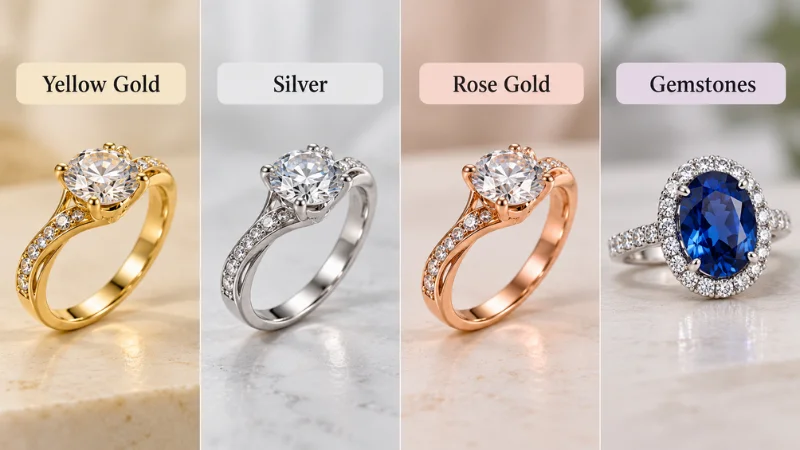
- Adjust white balance and exposure first.
- Keep gold warm, silver neutral, and rose gold natural.
- Compare with the original to preserve accurate gemstone colors.
Dust, Scratches, and Fingerprint Removal
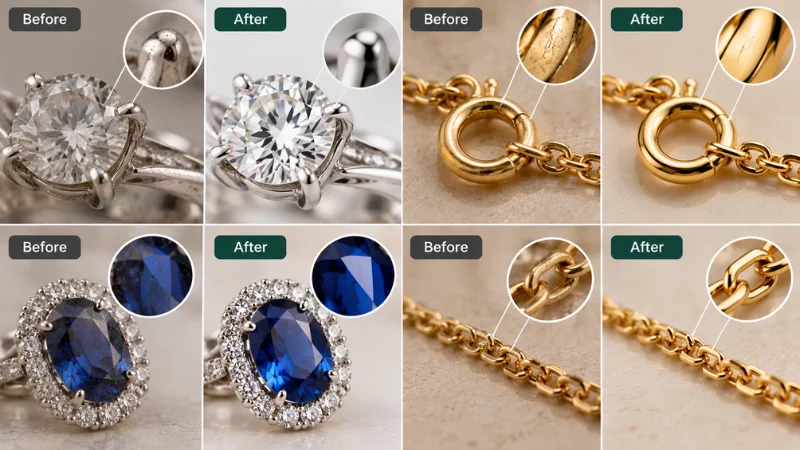
- Remove visible dust and fingerprints, especially in close-up images.
- Preserve natural textures and never hide actual product damage.
Controlled Sparkle and Reflection Enhancement
- Enhance existing highlights to make jewelry details clearer.
- Reduce harsh reflections that obscure the product’s shape or finish.
- Avoid adding artificial sparkle that misrepresents the gemstone.
Shadow and Depth
- Use soft shadows to separate the jewelry from the background.
- Maintain consistent shadow direction and intensity across product images.
Which Jewelry Images Should You Include in a Listing?
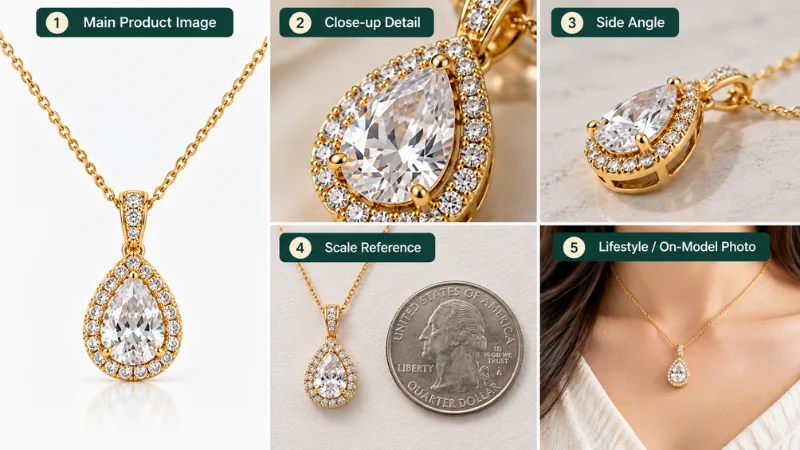
A good gallery answers common buyer questions about appearance, size, and construction. Depending on the item, include:
- Main product image: Show the complete piece clearly.
- Detail close-up: Highlight gemstones, clasps, settings, or textures.
- Alternate angle: Show the side profile or key construction details.
- Scale reference: Help buyers judge size and proportion.
- Lifestyle or on-model image: Show how the jewelry looks when worn.
Not every listing needs every image type. Pick the views that explain the specific product, and make sure each one represents the item accurately. Before publishing your listings, review these common jewelry photography mistakes to avoid misleading colors, poor framing, and inconsistent product images.
AI Editing vs. Manual Retouching for Jewelry
AI tools speed up background removal, basic adjustments, and lifestyle image creation. Reflective metal, thin chains, gemstone settings, and intricate details still need close manual review. For Etsy, make sure AI-assisted edits represent the actual item and follow the platform’s image policy. A hybrid workflow gives you speed with quality control.
DIY vs Professional Jewelry Photo Editing: When to Outsource
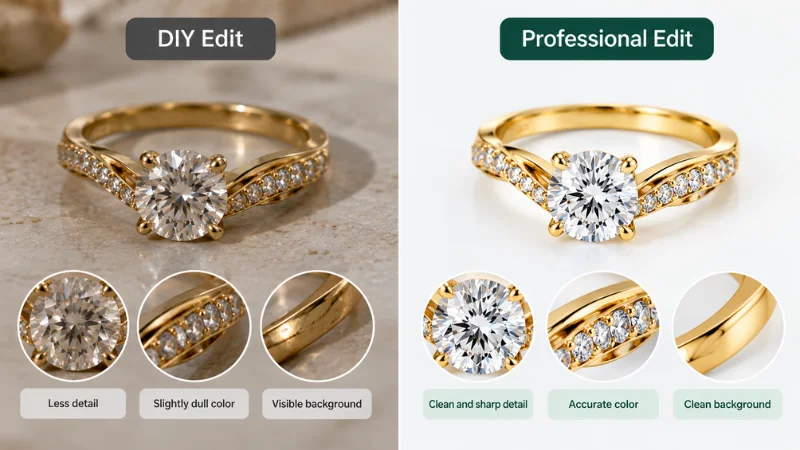
DIY editing works well for simple adjustments and small catalogs. Professional services are useful for intricate jewelry details, large image batches, and consistent results. Choosing the right approach to Jewelry Photo Editing for Etsy & Shopify depends on your budget, editing needs, and available time.
| Factor | DIY Editing | Professional Editing |
|---|---|---|
| Cost | Lower cost, but costs your time | Paid service, priced by editing needs |
| Time | Slow for detailed jewelry | Saves time on large batches |
| Metal and gemstone detail | Hard to edit accurately | Specialized retouching improves clarity and detail |
| Consistency | Varies between images | Keeps a uniform look across listings |
| Best for | Small catalogs and simple edits | Large catalogs, detailed jewelry |
Before choosing a professional service, compare jewelry photo editing costs to understand how image complexity and editing requirements affect pricing.
What You Can Fix Yourself: Tools and Practical Steps
If your original photos are sharp and well-lit, you can handle several basic edits yourself. The right tool depends on whether you need color correction, background removal, or export prep.
Which Jewelry Photo Editing Tool Should You Use?
| Tool | Best For |
|---|---|
| Adobe Photoshop | Background removal and edge cleanup |
| Adobe Lightroom | Exposure and color correction |
| Canva | Basic background removal and cropping |
Whatever tool you choose, follow the seven-step checklist above. Crop and straighten first, then correct color, then clean the background. Export the file, reopen it, and check colors, sharpness, and edges before uploading.
Automatic background removal can miss thin chains, small prongs, and reflective edges, so inspect every result. Strong reflections, blurred details, and complex designs need more advanced retouching.
What Usually Needs a Professional (And Why)
Basic cropping, brightness adjustments, and simple background cleanup are manageable for many sellers. Intricate designs need more precise editing to keep their original appearance.
Hire a professional for:
- Complex Background Removal: Preserve fine chains, and settings.
- Color Accuracy: Maintain natural metal and gemstone colors.
- Reflection Control: Reduce glare while preserving natural shine.
- Detailed Retouching: Remove dust without altering product details.
- Batch Consistency: Keep lighting, colors, and backgrounds uniform.
Outsource when detailed edits exceed your skills, large orders take too much time, or your catalog needs a consistent finish. For a small collection of clear, well-lit photos, DIY editing is enough.
Simple Decision Framework for Etsy & Shopify Sellers
Choose your approach based on catalog size, photo quality, and edit complexity.
| Situation | Best Option | Reason |
|---|---|---|
| Minor edits | DIY editing | Quick and easy |
| Intricate jewelry details | Professional | Preserves fine details |
| Incorrect colors | Try DIY first | Adjust white balance |
| Large image batches | Professional | Maintains consistency. |
| Frequent product launches | Both | Balance cost and quality |
What Professional Jewelry Photo Editing Improves
Professional jewelry retouching for ecommerce will not guarantee higher sales. It does give you consistent visuals, clearer product details, and less manual work.
Consistent, Marketplace-Ready Images
Different backgrounds, lighting, and cropping make a store look uneven. Apply the same guidelines for background color, brightness, shadows, and dimensions across rings, necklaces, bracelets, and earrings. That helps customers browse and compare products.
Check the latest Etsy, Shopify, and Google Merchant Center guidance before uploading. Editing prepares your files, but it does not guarantee approval.
More Time for Your Business
Editing hundreds of images one by one takes hours. Outsourcing background cleanup, color correction, and detailed retouching frees time for marketing, product development, and customer service. The goal stays the same: attractive jewelry that looks like the real piece.
How Clipping World Handles Jewelry Photo Editing for Etsy & Shopify
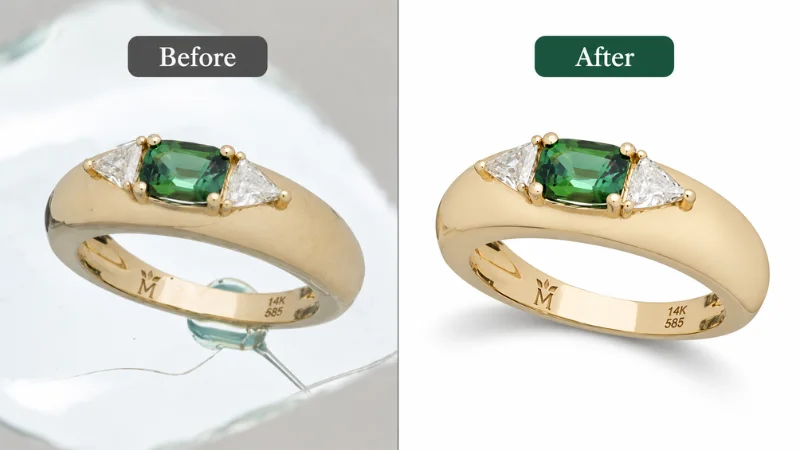
Clipping World offers jewelry photo editing services for ecommerce brands, photographers, manufacturers, and wholesalers. Its services include background removal, clipping paths, color correction, shadow creation, dust and scratch removal, shine enhancement, and fine-detail refinement.
A Step-by-Step Jewelry Photo Editing Workflow
- Submit a Free Trial or Request a Quote: Share your requirements to understand the service and pricing before placing a larger order.
- Upload Your Images: Send your files through supported transfer methods, such as WeTransfer, FTP, or Google Drive.
- Production: Editors work on the images according to your requirements, including background cleanup, color adjustment, and detail refinement.
- Quality Assurance: Clipping World’s stated workflow includes a final quality check to review the completed images against the project requirements.
- Delivery: Receive the finished files through your preferred delivery method.
For Etsy and Shopify sellers, clearly communicating your requirements is essential. Specify the desired background, natural metal colors, preferred image dimensions, and any details that must remain unchanged. For bulk projects, also provide reference images so the editing style stays consistent across the collection.
FAQ On Jewelry Photo Editing for Etsy & Shopify
How Do I Keep Gold and Silver Colors Accurate in Product Photos?
Use neutral lighting, correct white balance, and careful color correction. Preserve the natural tones of yellow gold, rose gold, silver, and gemstones. Compare edited images with the actual products to avoid misleading color changes.
Can AI Tools Handle Jewelry Photo Editing Well Enough for High-Value Pieces?
AI tools handle background removal and basic adjustments, but high-value jewelry often needs manual retouching. Review thin chains, gemstone settings, metal edges, and reflections carefully to keep fine details and realistic results.
How Many Jewelry Images Should I Use Per Etsy or Shopify Listing?
Aim for five to ten useful images per listing, depending on the product. Include a clear main image, multiple angles, close-ups, and lifestyle photos. Show details and scale so customers understand the piece before they buy.
Should I Use a Pure White Background for Every Jewelry Photo?
No. White or light backgrounds work best for your main image, especially if you sell through Google Shopping. Lifestyle backgrounds suit secondary images and help show style and scale. Avoid dark backgrounds and watermarks on main images, and keep colors accurate everywhere.
How Much Does Professional Jewelry Photo Editing Usually Cost?
Cost depends on image complexity, order volume, retouching needs, and turnaround time. Basic background cleanup usually costs less than detailed gemstone retouching or reflection correction. Request a quote based on your specific needs.
Can You Edit Both Flat-Lay and On-Model Jewelry Photos?
Yes. Flat-lay editing focuses on backgrounds, color, and detail. On-model editing can also include skin retouching and lighting adjustments, without changing the jewelry’s actual appearance.
Can a Jewelry Photo Editing Service Match My Existing Catalog Style?
Yes. An editing team can follow your catalog style using reference images and clear guidelines. Specify background color, brightness, metal tones, shadows, cropping, and dimensions so your Etsy or Shopify listings stay consistent.
How Long Does Professional Jewelry Photo Editing Take?
Turnaround depends on image quantity, editing complexity, and delivery requirements. Basic background cleanup is faster than detailed gemstone retouching. Share your image count, editing needs, and deadline to get a realistic estimate.
Final Thoughts
High-quality jewelry photos help shoppers evaluate products with confidence. Focus on accurate colors, clean backgrounds, sharp details, and consistent presentation. A reliable Jewelry Photo Editing for Etsy & Shopify workflow can help you maintain professional-looking listings as your store grows.
Get Professional Jewelry Photo Editing for Your Store
Need clean backgrounds, accurate metal colors, and consistent product images for Etsy or Shopify? Explore Clipping World’s jewelry photo editing services for background removal, color correction, shine enhancement, and fine-detail retouching. Start with a free trial to evaluate the editing quality before placing a larger order.