
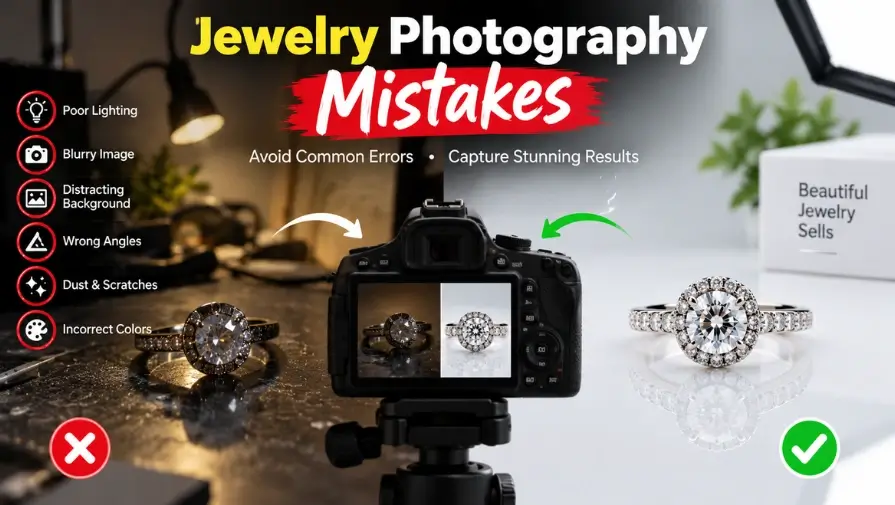
The most common jewelry photography mistakes include poor lighting, unwanted reflections, and inaccurate colors. Other problems include dirty jewelry, busy backgrounds, soft focus, inconsistent images, limited views, incorrect scale, and excessive retouching.
These mistakes can reduce product appeal and buyer trust. In this guide, we’ll cover the most common jewelry photo mistakes that hurt sales and share practical tips to avoid them, improve image quality, and present your jewelry accurately online.
Common Jewelry Photography Mistakes And Their Effects On Sales
| Photography Mistake | Effect On Product Images |
|---|---|
| Poor Lighting | Jewelry looks dull or overly bright |
| Unwanted Reflections | Important details become harder to see |
| Inaccurate Colors | Products may look different in person |
| Soft Focus | Fine jewelry details appear blurry |
| Busy Background | The product gets less attention |
| Inconsistent Images | The catalog looks less professional |
| Few Product Views | Buyers have less product information |
| Incorrect Scale | Customers may misunderstand the actual size |
| Over-Retouching | Jewelry may look unrealistic |
Why Jewelry Photography Is Challenging
Jewelry is harder to photograph than many other products because it is small, highly detailed, and often made from reflective metals and faceted gemstones. Gold, silver, platinum, and polished surfaces can reflect lights, cameras, and surrounding objects, making glare and unwanted reflections difficult to control.
This matters even more in ecommerce jewelry photography. At the same time, gemstones, engravings, and delicate settings require accurate color, precise focus, and sharp detail. These details often require careful jewelry photo editing after the shoot.
Make Every Jewelry Detail Shine
Remove glare, enhance details, and create clean jewelry images that look professional and ready for ecommerce.
Top Jewelry Photography Mistakes That Hurt Sales
These jewelry photography mistakes to avoid can affect quality and buyer confidence. Learning these mistakes helps you improve jewelry product photography.
1. Failing to Clean and Prepare the Jewelry
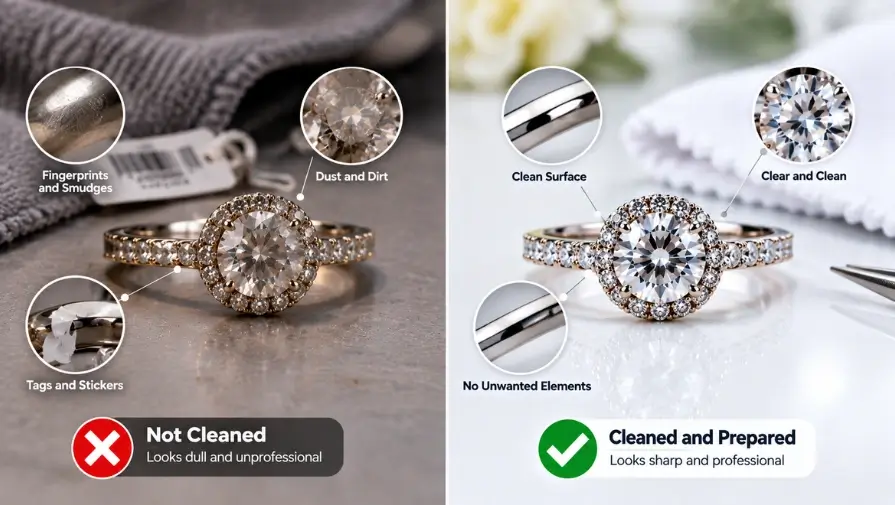
Dust, fingerprints, smudges, and other small imperfections can become highly visible in close-up jewelry photos. Tags, stickers, loose threads, or other unwanted elements can also distract from the product and make the image look less professional. Even minor surface flaws that are easy to fix before a shoot may require additional retouching later.
Cleaning and inspecting the jewelry before photography saves editing time and helps create sharper, cleaner product images. Check each piece carefully, polish it when appropriate, and remove any unwanted elements before placing it in front of the camera. Handle the jewelry with clean gloves when necessary to avoid leaving new fingerprints or smudges.
2. Using Poor or Harsh Lighting
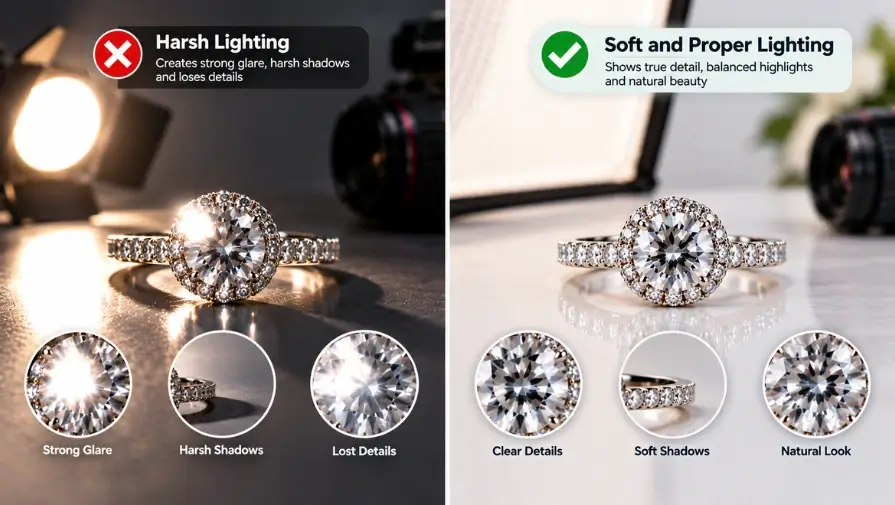
Lighting has a major effect on how jewelry looks in a product photo. Too little light can make metals and gemstones appear dull or dark, while excessive light can create blown-out highlights that hide important details.
Harsh, direct lighting can also produce strong shadows, excessive contrast, and distracting reflections, especially on polished metals and faceted gemstones. Soft, controlled lighting helps create balanced highlights and shadows while preserving the natural texture, color, and detail of the jewelry.
3. Ignoring Reflections on Polished Surfaces
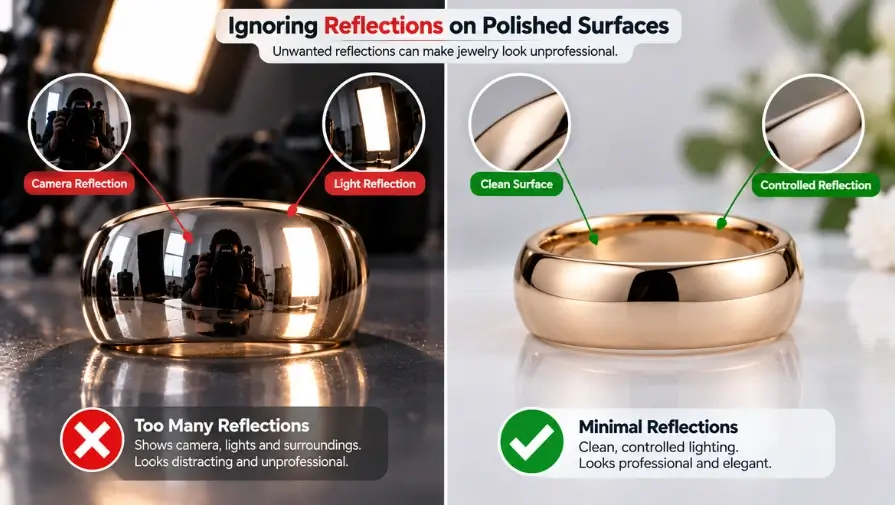
Polished metals and gemstones naturally reflect their surroundings, making unwanted reflections one of the most common jewelry photography problems. Cameras, light sources, studio equipment, and nearby objects can appear on reflective surfaces as distracting shapes or bright glare spots.
These reflections can hide fine details, affect the appearance of the metal, and make the final image look less polished. Controlling reflections during the shoot is usually better than trying to remove every reflection in post-production. Small changes in the jewelry angle, camera position, or lighting direction can significantly reduce unwanted glare while preserving natural highlights.
4. Using Inaccurate White Balance and Color
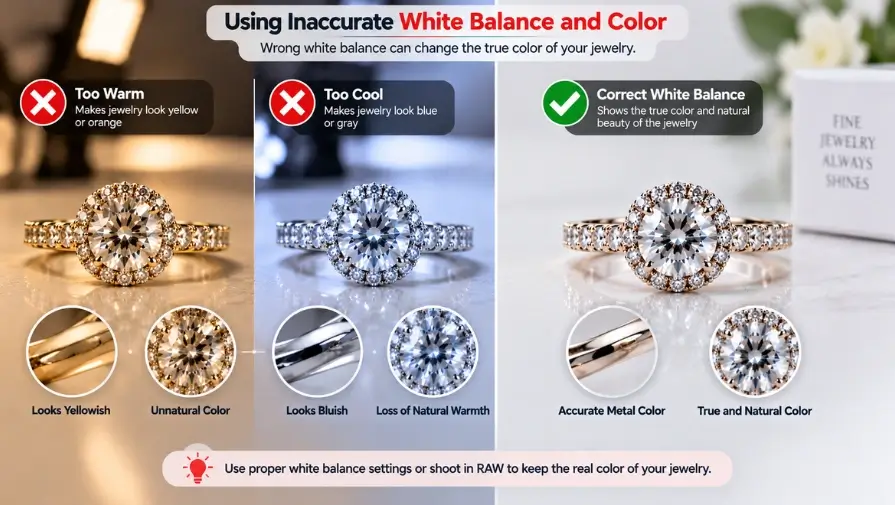
Incorrect white balance can make jewelry colors look different from the actual product. Gold may appear too yellow, silver can take on a blue or gray cast, and gemstones may look more saturated or muted than they are in real life. These inconsistencies become especially noticeable when customers compare multiple products in the same collection.
Accurate color representation is important because shoppers use product images to judge the material, finish, and gemstone color before buying. If the image does not match the actual jewelry, customers may lose trust and be more likely to request a return.
5. Choosing a Busy Background or Too Many Props
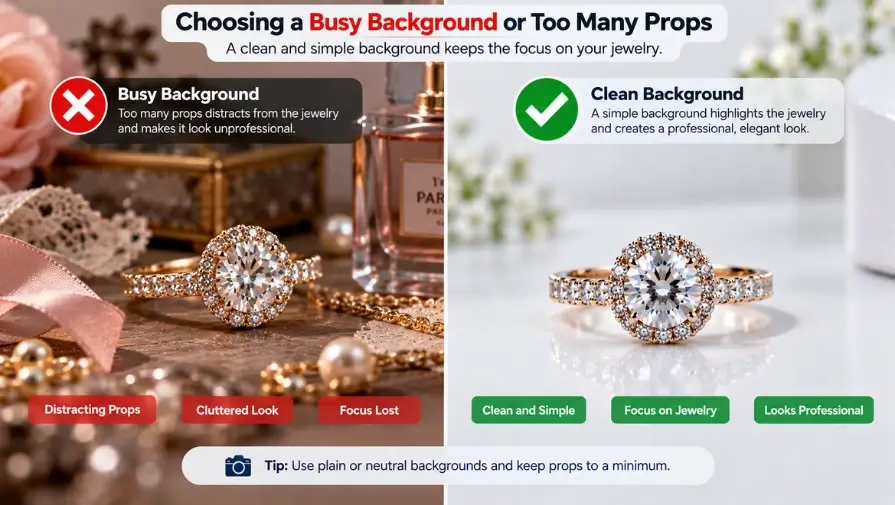
A complicated background or excessive use of props can distract shoppers from the jewelry itself. Patterns, strong colors, decorative objects, or unnecessary mannequins can compete with the product and make the composition feel cluttered. For standard ecommerce product photos, a clean and controlled presentation usually works better because it keeps attention on the jewelry and its details.
Creative backgrounds and props can still be useful for lifestyle or editorial photography when they provide context or support the brand’s visual style. The key is to make sure they complement the jewelry rather than overpower it.
6. Creating Inconsistent Product Images
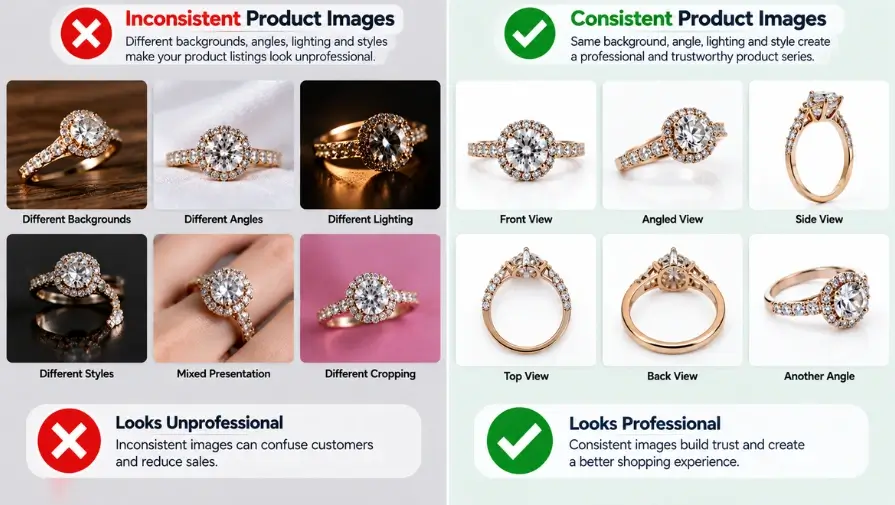
Inconsistent product images can make an ecommerce jewelry collection look unprofessional and difficult to compare. Differences in cropping, image size, background, lighting, product positioning, or overall visual style can create a disconnected appearance across product pages.
A uniform visual style helps shoppers focus on the jewelry instead of adjusting to a different presentation for every product. It also creates a more polished and recognizable brand experience.
7. Using Soft Focus or Insufficient Depth of Field
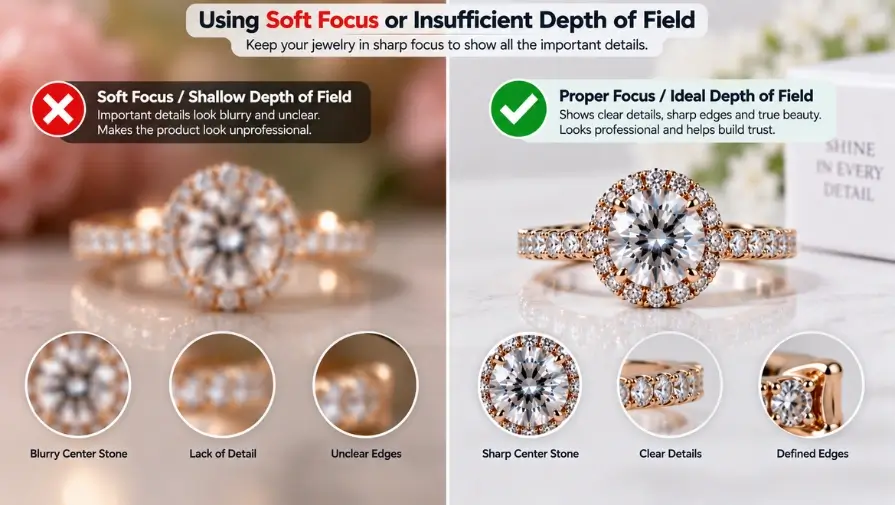
Jewelry has small details that must stay sharp and clearly visible in ecommerce images. Soft focus, shallow depth of field, or poor camera stability can leave parts of a ring, necklace, earring, or gemstone out of focus. This can hide important details such as stone cuts, settings, engravings, and fine metalwork.
A tripod helps keep the camera stable, while a suitable aperture can provide greater depth of field. A macro lens is useful for close-up detail shots, and focus stacking can help keep complex jewelry pieces sharp from front to back when a single exposure cannot capture enough depth.
8. Showing Too Few Angles and Product Views
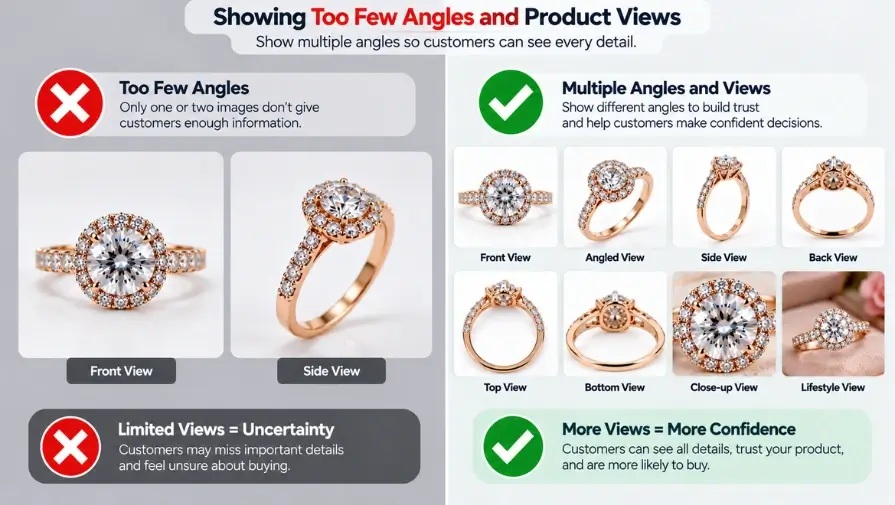
A single jewelry ecommerce product photo rarely gives shoppers enough information to understand a jewelry piece fully. Customers may need to see the front, side, and top views, along with close-up images that reveal gemstone details, settings, clasps, and other important features.
For certain products, an on-model or scale image can also help shoppers understand the item’s size and proportions. Providing multiple useful views allows customers to examine the jewelry more like they would in a physical store. It can also reduce uncertainty about the product’s shape, construction, and appearance before purchase.
9. Ignoring Scale and Real-World Proportions
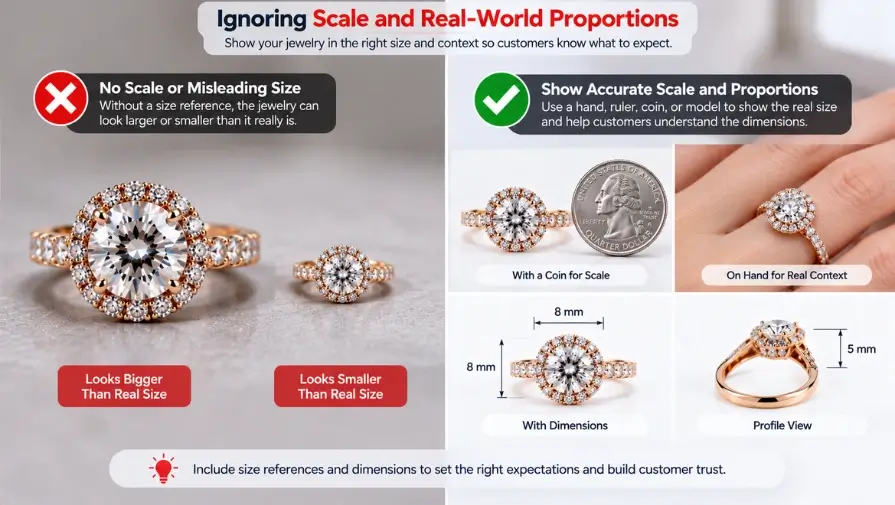
Close-up jewelry photos can make a product appear much larger than it actually is, making it difficult for shoppers to understand its real size and proportions. This is especially important for rings, earrings, pendants, and other small pieces where a highly magnified image may not show how the jewelry looks when worn.
Showing the jewelry on a person or including a useful scale reference can give shoppers better context. This helps them understand the size, shape, and proportions of the piece before making a purchase.
10. Over-Retouching the Jewelry
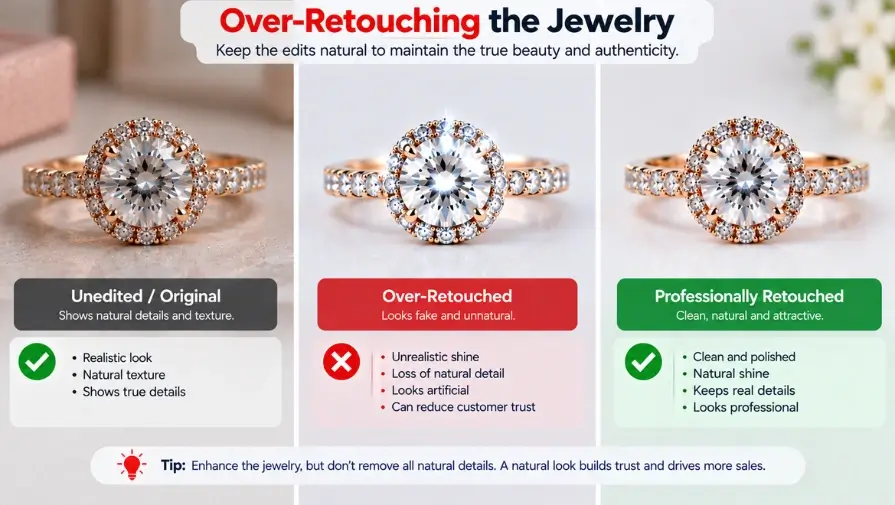
Retouching can improve the appearance of jewelry photos, but excessive editing can make the product look unrealistic. Over-smoothing metal, adding artificial gemstone sparkle, changing the natural color of metals or stones, or removing every trace of texture can create a misleading representation.
Altering the jewelry’s actual shape or design can also cause customers to receive a product that looks different from what they expected. The goal of professional retouching should be to enhance the image while preserving the jewelry’s real characteristics. Minor distractions can be removed, but important details, proportions, colors, textures, and natural highlights should remain accurate.
How Jewelry Photography Mistakes Affect Sales
Common jewelry product photo mistakes can also increase customer hesitation. Poor jewelry photography does more than make a product look less attractive. It can affect how shoppers judge quality, trust a brand, and decide whether to buy. When product images are unclear, inconsistent, or inaccurate, customers may hesitate to purchase or develop expectations that the actual product cannot meet.
Buyer Trust and Perceived Product Value
Clear, accurate jewelry photos give shoppers the information they need to evaluate a product before buying. Sharp details, realistic colors, and professional presentation can make it easier for customers to understand the jewelry’s quality and craftsmanship. When the images truly represent the product, they also help build trust and confidence in the brand.
Higher Returns from Misleading Images
Inaccurate product images can create unrealistic expectations about a jewelry item’s color, size, shape, detail, sparkle, or proportions. If the jewelry looks noticeably different when it arrives, customers may feel disappointed and request a return or leave a negative review. Careful photography and careful retouching help set realistic expectations and reduce this risk.
Poorer Product Presentation
Low-quality or inconsistent jewelry images can make an entire product collection look less professional. Differences in lighting, cropping, backgrounds, or image quality can weaken the visual consistency of an ecommerce store and reduce the perceived quality of the brand.
How Professional Jewelry Photo Editing Can Fix Common Issues
Good photography provides the foundation for a professional jewelry image, while thoughtful post-production can refine the final result. Professional jewelry photo editing can remove distracting imperfections, improve color and clarity, and create a consistent visual style across a product catalog. However, retouching should enhance the image without changing the jewelry’s true appearance.
Background Removal and Cleanup
Jewelry background removal can eliminate unwanted elements and create a clean, consistent presentation for ecommerce product images. A controlled background keeps attention on the jewelry and makes different products easier to compare across a collection.
Editing Benefits
- Removing distracting background elements
- Creating clean product presentations
- Maintaining consistent backgrounds across product images
Color and White Balance Correction
Professional photo color correction can fix unwanted color casts and improve color matching between images taken under different lighting conditions. For jewelry, the goal is to preserve the actual appearance of metals and gemstones rather than making them look artificially enhanced.
Editing Benefits
- Correcting unwanted color casts
- Matching color tones across a collection
- Preserving realistic metal and gemstone colors
- Balancing brightness and contrast where needed
Reflection and Blemish Cleanup
Professional retouching can remove distracting reflections, dust, fingerprints, and minor surface imperfections that remain after photography. Careful editing should clean up these distractions without removing natural highlights or changing the character of the jewelry.
Editing Benefits
- Removing distracting reflections
- Cleaning dust and fingerprints
- Removing minor scratches and blemishes
- Preserving realistic metal and gemstone surfaces
Detail and Clarity Enhancement
Careful editing can improve the visibility of fine jewelry details without creating artificial texture or sharpness. This is particularly useful for close-up product images where customers need to see gemstones, settings, engravings, and other small details clearly.
Editing Benefits
- Improving visible detail
- Enhancing clarity where appropriate
- Correcting minor image-quality issues where possible
- Improving presentation without creating artificial details
Jewelry Retouching for Cohesive Catalogs
Professional jewelry retouching can help standardize the appearance of jewelry images across an ecommerce catalog. Consistent crops, backgrounds, lighting adjustments, and overall image treatment create a more polished and cohesive product presentation.
Editing Benefits
- Standardizing image appearance
- Matching crop and composition
- Maintaining consistent tones across product collections
- Creating a cohesive visual style
A professional image retouching service provider can improve many post-production issues, but it cannot fully repair fundamentally poor photography, missing product angles, severe blur, or inaccurate product representation. The best results come from combining careful photography with accurate, controlled editing.
Best Practices for Better Jewelry Photos Before Editing
Good retouching starts with good source images. A clean product, controlled lighting, accurate color, and consistent shooting setup can reduce editing work and produce better final results. Use this simple checklist before publishing your jewelry photos. These jewelry photography tips can help create better source images.
Before the Shoot
- Clean and polish the jewelry.
- Inspect stones, settings, and surfaces for visible issues.
- Prepare a consistent shot list for each product.
- Choose a simple, distraction-free background.
- Set up controlled, diffused lighting.
- Set and check the white balance.
- Clean the camera lens and other shooting equipment.
During the Shoot
- Use a tripod to keep the camera stable.
- Adjust the jewelry and light positions to control reflections.
- Maintain consistent product positioning.
- Capture multiple useful angles.
- Take close-up detail shots where needed.
- Check focus and sharpness at 100% zoom.
- Review test images before photographing the full collection.
Before Publishing
- Check color accuracy against the actual jewelry.
- Check background and image-style consistency.
- Confirm that important details are sharp and visible.
- Remove unwanted imperfections during retouching.
- Make sure the jewelry still looks realistic after editing.
- Export images in an appropriate web-friendly format and color profile.
Following these practices can reduce common photography problems and make the editing process more efficient. More importantly, they help ensure that your final jewelry images remain sharp, accurate, consistent, and realistic. The goal is to create product photos that give shoppers a clear and trustworthy view of the jewelry before they make a purchase.
Frequently Asked Questions
What Are The Most Common Jewelry Photography Mistakes?
The most common jewelry product photography mistakes include poor or harsh lighting, unwanted reflections, inaccurate colors, dirty products, distracting backgrounds, inconsistent jewelry product image styles, soft focus, too few product views, poor scale, and excessive retouching. These issues can make jewelry look less appealing or different from the actual product.
How Do Reflections Affect Jewelry Photos?
Unwanted reflections can create bright glare spots, show cameras or light sources, and hide important details on polished metals and gemstones. Controlling reflections during the shoot helps preserve the jewelry’s natural highlights and makes the final image clearer and more professional.
How Can I Make Jewelry Photos Look More Realistic?
Use soft, controlled lighting, accurate white balance, and proper color correction to capture the jewelry as it appears in real life. During editing, remove distracting imperfections while preserving natural textures, highlights, colors, proportions, and other important product details.
Why Is Color Accuracy Important In Jewelry Photography?
Accurate color helps customers understand what the jewelry will actually look like before they buy it. Incorrect metal or gemstone colors can create unrealistic expectations, reduce buyer trust, and potentially contribute to returns or customer dissatisfaction.
How Many Photos Should I Take For A Jewelry Product?
There is no single number that works for every jewelry product, but multiple useful views are generally better than relying on one image. Consider including front, side, top, close-up detail, and contextual or on-model views when they help shoppers understand the product’s design, size, and proportions.
Does Background Removal Help Jewelry Listings?
Yes. Background removal can eliminate distracting elements and create a clean, consistent presentation that keeps attention on the jewelry. Consistent backgrounds can also make products easier to compare across an ecommerce catalog.
Can Professional Retouching Fix Bad Jewelry Photography?
Professional retouching can correct issues such as dust, fingerprints, minor blemishes, unwanted reflections, color casts, background problems, and some clarity issues. However, it cannot fully repair missing product views, severe blur, fundamentally poor lighting, or inaccurate product representation. Good photography provides the foundation, while retouching helps refine the final image.
What Is The Best Background For Jewelry Photography?
For ecommerce jewelry photos, clean and neutral backgrounds work well. White, light gray, or other simple backgrounds keep attention on the jewelry. Lifestyle photos can use more creative backgrounds when they support the brand and product.
Conclusion
Good jewelry photography is about more than making products look beautiful. True-to-life colors, sharp details, controlled reflections, and realistic proportions help shoppers buy with confidence. Avoiding common photography mistakes can improve image quality and consistency.
Professional retouching can also remove distractions, correct colors, and improve overall presentation. However, jewelry should always look realistic after editing. The goal is to present each product clearly, accurately, and attractively.
If your jewelry photos need professional cleanup, color correction, reflection removal, or detailed retouching, Clipping World’s professional jewelry photo retouching service can help. Get clean, consistent, ecommerce-ready images while preserving your jewelry’s true appearance.