
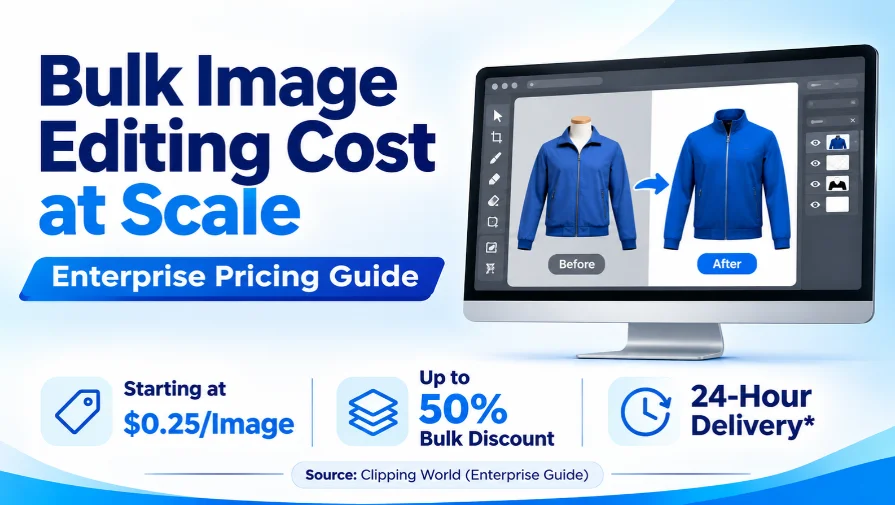
In 2026, bulk image editing at scale costs $0.25–$0.50 per image for simple cutouts and $0.50–$1.50 per image for ghost mannequin edits. For complex jewelry and high-end retouching, pricing typically ranges from $2.50–$3.50+ per image. At 5,000+ images per day, eligible bulk orders may qualify for discounts of up to 50%, depending on complexity, turnaround time, and workflow requirements.
Managing thousands of product photos takes more than low per-image rates. You must balance daily capacity, strict quality checks, and fast 12 to 24-hour delivery. Your product visuals also need to stay consistent across Amazon, eBay, and Shopify.
This guide breaks down 2026 bulk photo editing prices and total costs compared with in-house teams. You will also learn about the hidden costs of AI tools and get a practical checklist for hiring a reliable partner.
2026 Bulk Image Editing Pricing Tiers by Daily Volume
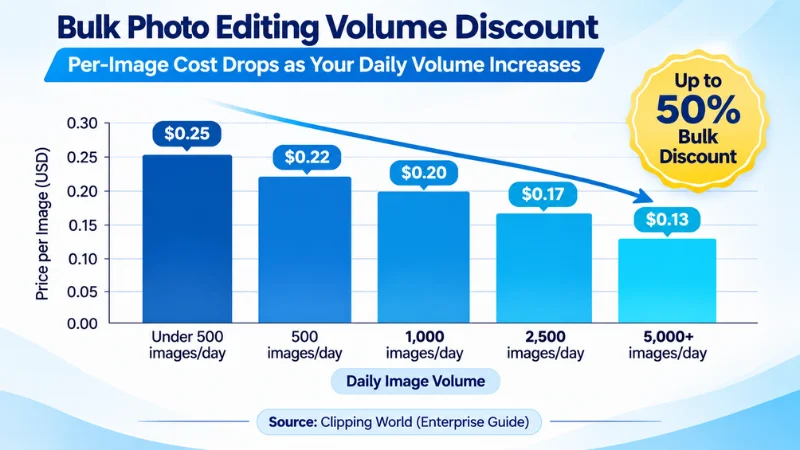
Rates below are indicative for Tier 1 easy editing, such as simple cutouts and white-background preparation. Actual pricing varies by editing complexity, turnaround time, and eligibility for volume discounts.
| Daily Image Volume | Estimated Price Per Image | Estimated Daily Spend | Potential Bulk Discount |
|---|---|---|---|
| Under 500 images/day | $0.25 | Up to $124.75 | Standard base rate |
| 500 images/day | $0.22 | $110.00 | ~12% off base rate |
| 1,000 images/day | $0.20 | $200.00 | ~20% off base rate |
| 2,500 images/day | $0.17 | $425.00 | ~32% off base rate |
| 5,000+ images/day | $0.13 | $650.00+ | Up to 50%, subject to eligibility |
These figures are planning estimates for simple, repeatable editing work. Ghost mannequin, jewelry retouching, and other complex services are priced separately based on the level of manual work required. Discounts of up to 50% depend on order volume, service type, editing complexity, and applicable offer terms.
Data Methodology Note: These 2026 pricing benchmarks come from Clipping World’s internal production data since 2010 across global e-commerce brands, studios, and agencies, alongside published batch photo editing rate cards.
Why Flat-Rate Subscriptions Fail Large Catalogs
Flat-rate monthly subscriptions often fail brands with mixed product catalogs. A fixed fee ignores the huge labor gap between simple boxes and shiny jewelry. Most flat-rate plans also limit your daily uploads, which slows down big seasonal launches.
Pricing Breakdown by Technical Complexity
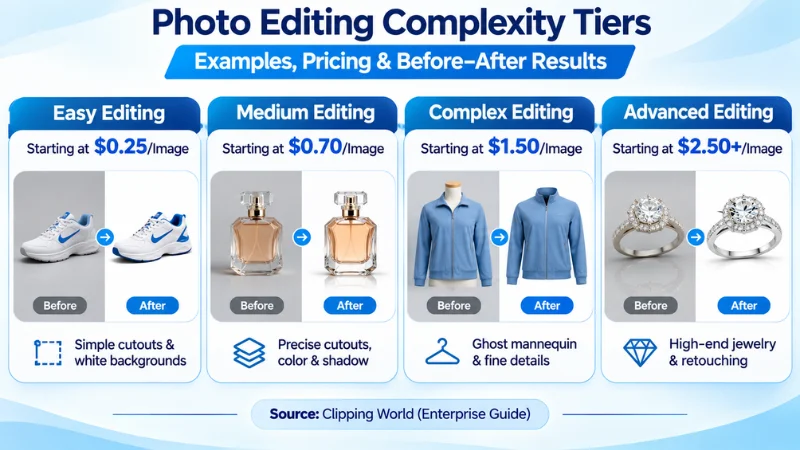
Bulk image editing rates depend on how much manual work each photo needs. Service providers commonly group projects into four complexity tiers: Easy ($0.25/image), Medium ($0.70/image), Complex ($0.50–$1.50/image), and Advanced ($2.50+/image). Sorting your SKUs by complexity before requesting quotes helps you build a more accurate editing budget.
Tier 1: Easy Editing — Simple Cutouts & White Backgrounds
Estimated starting rate: $0.25 per image, before volume discounts.
Best for: Hard-edged products such as boxes, shoes, and basic electronics.
What you get:
- Hand-drawn clipping paths in Photoshop
- Pure-white or transparent backgrounds
- Basic lighting and exposure corrections
- Marketplace-ready sizing for Amazon, eBay, and Shopify
Tier 2: Medium Editing — Precise Cutouts & Multi-Adjustments
Estimated starting rate: $0.70 per image, before volume discounts.
Best for: Multi-part products, curved apparel, and catalogs that require consistent color matching.
What you get:
- Multi-path cutouts for detailed product edges
- Brightness, contrast, and color-balance corrections
- Natural drop shadows
- Consistent editing style across a product batch
Tier 3: Complex Editing — Ghost Mannequin & Fine Details
Estimated starting rate: $0.50 per image. Complex ghost mannequin projects may cost up to $1.50+ per image, before volume discounts.
Best for: Clothing brands, fashion catalogs, layered garments, and products with intricate inner edges.
What you get:
- Ghost mannequin or neck-joint composites
- Wrinkle smoothing and garment-shape correction
- Fine-detail cutouts and inner-edge masking
- Realistic shadows and consistent apparel presentation
Tier 4: Advanced Editing — High-End Jewelry, Masking & Retouching
Estimated starting rate: $2.50+ per image; advanced jewelry retouching can reach $3.50+ per image, before volume discounts.
Best for: Fine jewelry, glassware, portraits, luxury goods, and highly reflective products.
What you get:
- Detailed hair, fur, glass, and transparent-object masking
- Dust, scratch, and imperfection removal
- Metal reflection polishing and shine enhancement
- Precise product color matching and premium retouching
Total Cost of Ownership (TCO): In-House vs. Freelancers vs. Studio
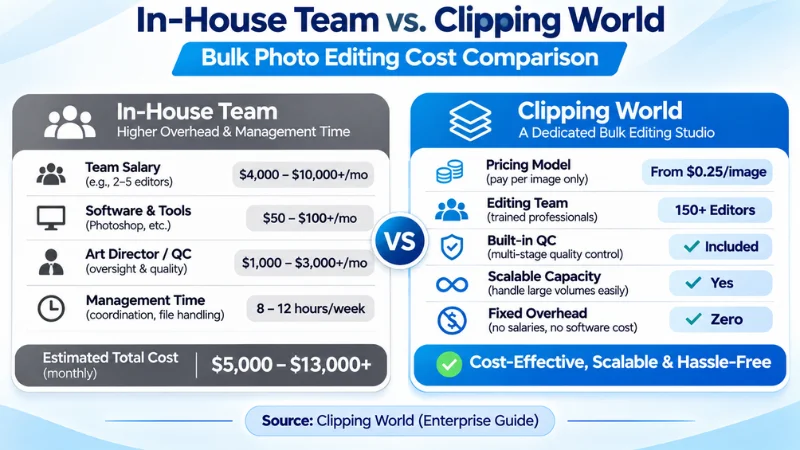
Choosing a dedicated bulk photo editing studio can reduce the total cost of managing large image volumes compared with maintaining an in-house team. However, the actual savings depend on production volume, staffing requirements, software expenses, and editing complexity.
To calculate your true cost, look beyond the per-image rate and consider salaries, software licenses, equipment, and management time.
| Factor | In-House Team | Freelancers | Editing Studio |
|---|---|---|---|
| Cost per image | Higher | Medium | Lower at volume |
| Fixed costs | High | Low | Low |
| Turnaround | Depends on team capacity | Can be delayed | Usually 12–24 hours |
| Quality control | You manage it | You review more | Studio handles initial QC |
| Scaling | Slow | Limited | Faster |
| Best for | Full control, steady work | Small or occasional orders | Large, recurring catalogs |
The Hidden “Time Tax” of Freelance Marketplaces
Hiring solo freelancers at $0.50–$1.50 per image can look inexpensive at first. However, your team still spends hours every week sorting files, checking edits, and fixing uneven colors or shadows. A managed studio reduces this time tax through standardized workflows and built-in quality control.
The AI Blindspot: Why $0.05 Automated Tools Double Your Budget
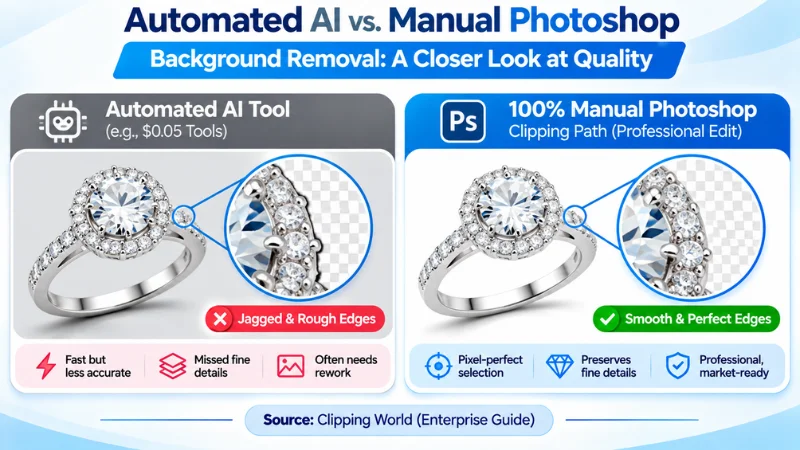
Using $0.05–$0.10 AI background removers on commercial catalogs often doubles your editing budget. AI tools work fine for quick drafts, but human editors must later fix their rough edges and color mistakes.
Where AI Tools Fail
Automated tools struggle with flyaway hair, clear glass, mesh fabrics, bike spokes, and shiny jewelry. Leaving rough edges on your store lowers buyer trust and increases product returns.
The Double-Paying Math
Paying $0.08 for an AI tool and then paying a human $0.45 to fix the broken layers costs more than starting with 100% manual Photoshop editing.
The Smart Hybrid Approach
Use automation for simple file renaming and tagging. Send your actual cutouts, masking, and retouching to skilled human Photoshop editors.
Enterprise QA and Overnight Delivery Infrastructure
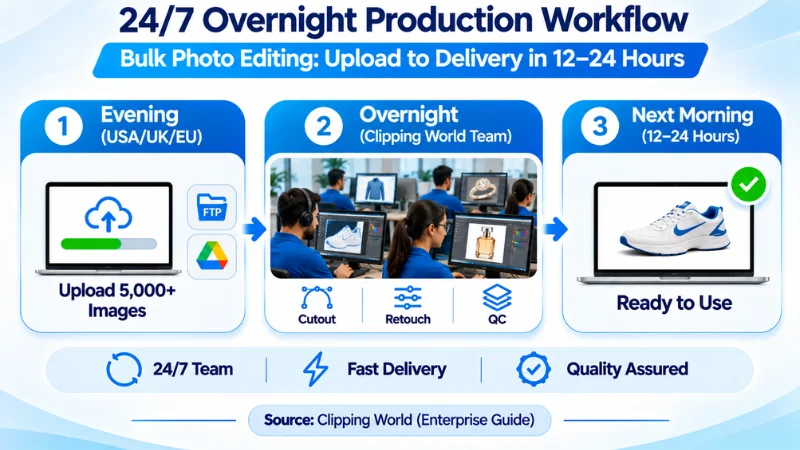
A strong editing partner can support high daily volumes, including 5,000+ images per day, through multi-stage quality checks and round-the-clock or multi-timezone production teams. One sample image cannot show how a vendor performs across 3,000 SKUs during a busy product launch.
Multi-Stage Quality Checks
Every batch should pass through file-intake checks, manual Photoshop editing, senior lead review, and marketplace-ready checks for Amazon, eBay, and Shopify requirements.
24/7 Shifts and Overnight Delivery
Round-the-clock or multi-timezone teams allow you to upload raw shoots at the end of your workday in the USA, UK, or Europe. You can typically receive finished files within 12–24 hours; rush delivery may be available in as little as 4–6 hours for eligible orders.
No Upfront Payment and Unlimited Revisions
Trusted partners reduce buyer risk by offering no upfront payment on approved accounts. They also provide unlimited revisions until every image meets the original brief and your brand guidelines. Additional requests outside the agreed scope may be billed separately.
Enterprise Procurement Checklist: 5 Contract Clauses to Protect Your Business
Before signing a high-volume image editing agreement, establish clear contract terms to protect your budget, delivery schedules, confidential assets, and finished files. Include these five essential clauses in your procurement agreement.
1. Clear Volume-Based Pricing and Discount Terms
Define pricing tiers based on daily or monthly image volumes. Specify the applicable per-image rates, minimum order quantities, and conditions for qualifying for bulk discounts of up to 50%. Your agreement should also explain how pricing changes if order volumes increase, decrease, or fall below the agreed threshold.
2. Guaranteed Turnaround Times and Service-Level Agreements (SLAs)
Set clearly defined delivery commitments based on image volume and editing complexity. For example, specify standard delivery windows of 12–24 hours for eligible orders and priority processing options for urgent product launches. The agreement should also cover delay notifications, escalation procedures, and responsibilities when delivery deadlines are missed.
3. Non-Disclosure Agreements (NDAs) and Intellectual Property Protection
Protect unreleased product collections, prototypes, and confidential commercial photography through legally appropriate confidentiality agreements. Define how vendors can access, use, store, and share your image assets. Clarify ownership of source images and completed deliverables, along with restrictions on unauthorized use, disclosure, or portfolio publication.
4. Source File and Deliverable Requirements
Specify the final file formats, image dimensions, color profiles, and naming conventions required for each project. If your internal team needs future editing flexibility, include layered PSD or TIFF files with clearly named clipping paths as agreed deliverables. Confirm whether editable source files are included in the quoted price or billed separately.
5. Secure File Transfers and Data Deletion Policies
Define approved file transfer methods, such as FTP, SFTP, Google Drive, Dropbox, or WeTransfer, according to your organization’s security requirements.
Your agreement should specify:
- Approved file transfer and storage methods
- Authorized access permissions
- Data retention periods
- Secure deletion procedures
- Deletion confirmation upon project completion or contract termination
Clear data handling requirements help protect confidential product images throughout the production process.
How to Choose the Right Editing Model (Quick Decision Guide)
The right image editing plan depends on how many photos you process each month and how fast you need them back. Use the quick guide below to match your order volume with the most cost-effective option.
- Small or Occasional Orders (Under 500 images/month): Pay per image starting at $0.25. You do not need to sign a monthly contract.
- Steady Weekly Work (500–2,500 images/day): Choose a bulk pricing plan. You get a dedicated team and guaranteed 12 to 24-hour delivery.
- Large Daily Orders (5,000+ images/day): Work with a 150+ editor studio running 24/7. You get overnight delivery and up to 50% off bulk rates.
FAQs About Bulk Image Editing Costs (2026)
How Much Does Bulk Image Editing Cost Per Image in 2026?
Bulk image editing costs $0.25–$0.50 per image for simple cutouts and white backgrounds. Ghost mannequin edits cost $0.50–$1.50 per image, while complex jewelry retouching costs $2.50–$3.50+. Large daily batches qualify for bulk discounts of up to 50%.
Why Do AI Background Removers Struggle with Complex Product Images?
AI background removal tools use automated image segmentation to separate subjects from backgrounds. However, results can vary when images contain fine hair, mesh fabrics, or intricate jewelry. Some images may require manual refinement to achieve clean, professional results.
What Turnaround Time Can You Expect for Bulk Image Editing?
Established 24/7 studios deliver bulk batches within 12 to 24 hours, with 6-hour express options for urgent orders. Overnight shifts let US, UK, and European teams upload raw photos at day’s end and receive finished files the next morning.
Do Bulk Photo Editing Providers Offer Free Trials Before a Full Order?
Yes, trusted editing companies offer 3 free trial images with no upfront payment. You can test their edge accuracy, color matching, and delivery speed on your own product photos before placing a bulk order.
How Is Data Security Handled for Unreleased Product Images?
Professional partners sign strict NDAs, limit file access to your assigned editors, and transfer files via encrypted FTP or cloud links. They also follow strict file deletion schedules to keep your unreleased products safe.
Scale Your Image Editing Without Compromising Quality
To scale post-production smoothly, you need a trusted editing partner that meets your volume, quality, and deadline needs. Grouping images by complexity, checking vendor quality controls, and balancing manual work with smart workflows help you protect brand consistency and cut costs.
Partner with Clipping World to speed up your bulk image editing workflow. With 150+ skilled Photoshop experts and a 24/7 production team processing 5,000+ images daily, we deliver 100% manual edits within 12 to 24 hours.
Want to Test Our Quality Before Placing a Full Order?
Send us a free trial batch (3 sample images) today with no upfront payment. You will get a custom bulk quote (with discounts of up to 50%) and experience our multi-step quality checks, layered file delivery, and unlimited revisions firsthand.
Conclusion: Scale Your Catalog Production with Confidence
Managing bulk image editing costs at scale becomes predictable when you match your catalog size with the right production partner. With a 24/7 studio team, you get both fast delivery and clean manual edits. Start with a small test batch on your own photos. Once you see the quality, you can scale up your orders without hiring full-time staff.