

Black Friday is one of the busiest times for ecommerce stores. Customers expect better deals and a great shopping experience. But many stores prepare their product images too late. Poor images can reduce trust and hurt product sales. This makes photo editing an important part of Black Friday preparation.
This ecommerce Black Friday checklist helps you prepare your product images and visual assets. It covers photo editing, image optimization, promotional visuals, marketplace images, ads, and final image checks.
Send us your photos and get a quick, free quote for your project. Get 5% free images plus up to 50% off on qualifying bulk orders. This BFCM offer is valid until November 30, 2026.

Black Friday Photo Editing Offer: 5% Free Images + Up to 50% Off
Save more on professional photo editing with our Black Friday offers. Get 5% free images plus up to 50% off on qualifying bulk orders, depending on the service, order volume, and editing complexity.
| Photo Editing Service | Starting Price | Black Friday Price* |
|---|---|---|
| Clipping Path | $0.29/image | From $0.145/image |
| Background Removal | $0.20/image | From $0.10/image |
| Image Masking | $1.00/image | From $0.50/image |
| Product Retouching | $0.50/image | From $0.25/image |
| Ghost Mannequin | $0.50/image | From $0.25/image |
| Jewelry Retouching | $3.50/image | From $1.75/image |
| Ecommerce Photo Editing | $0.20/image | From $0.10/image |
| Batch Photo Editing | $0.25/image | From $0.125/image |
| Multi Clipping Path | $0.70/image | From $0.35/image |
| Clipping With Shadow | $0.35/image | From $0.175/image |
🎁 5% FREE IMAGES + UP TO 50% OFF
Qualifying bulk orders can receive 5% free images plus up to 50% off. Black Friday prices shown above are based on a qualifying 50% discount. Actual pricing depends on order volume, service type, editing complexity, and applicable offer terms.
What Is an Ecommerce Black Friday Checklist?
An ecommerce Black Friday checklist is a preparation list for online stores. It helps businesses prepare their products, website, inventory, and customer experience before Black Friday and Cyber Monday. A checklist helps reduce last-minute errors and keeps important tasks organized.
Product images deserve special attention because they affect product presentation. Stores may need background removal, retouching, resizing, color correction, and promotional graphics. Early preparation helps maintain consistent quality across product pages, marketplaces, ads, social media, and email.
Ecommerce Black Friday Photo Editing Checklist
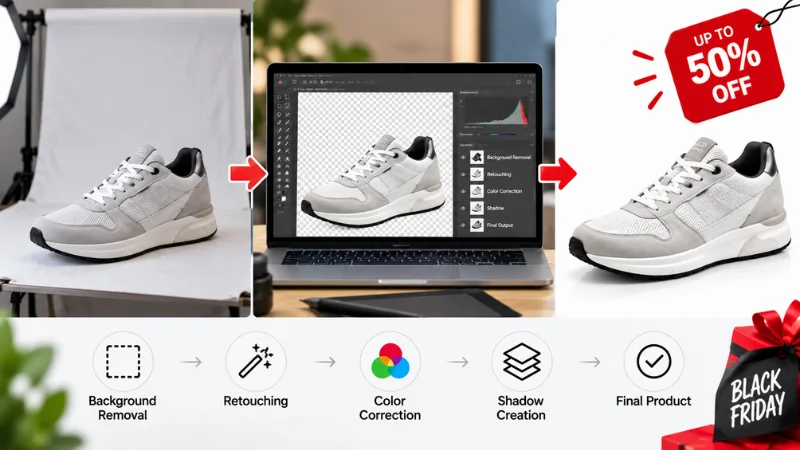
Your product images need careful preparation before Black Friday. Black Friday product photo editing should start with an audit of your existing images. Focus on the products receiving the most attention. This helps you manage editing work before the sales rush.
Audit Your Existing Product Images
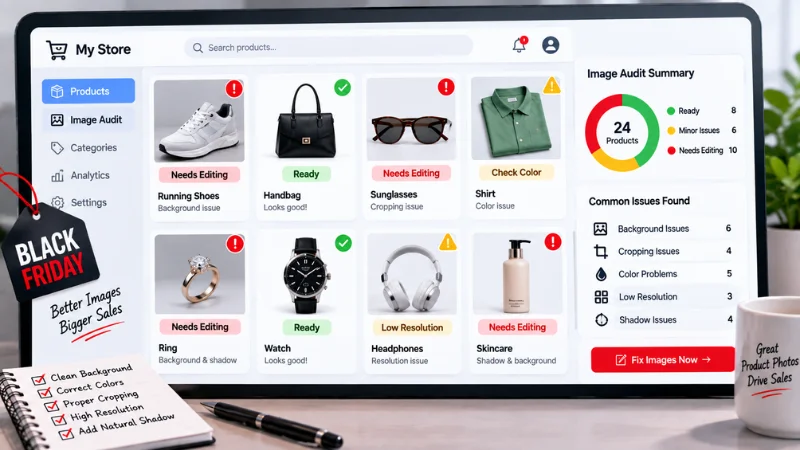
Start by reviewing every important product image. Focus on products that will receive Black Friday traffic.
Use this quick audit:
- Check image quality and resolution.
- Find outdated product images.
- Identify inconsistent backgrounds.
- Check cropping and dimensions.
- Find blurry product images.
- Check color inconsistencies.
- Identify missing product angles.
Fixing these issues early gives your team more time. It also creates a more consistent shopping experience.
Prioritize Your Black Friday Products
You do not need to edit every product first. Start with products that will receive the most attention. Divide your products into three priority groups.
Priority 1: High-Value Products
- Bestselling products
- Hero products
- Products with the biggest discounts
- Products featured in major campaigns
Priority 2: Seasonal Products
- Gift products
- Product bundles
- Holiday collections
- Seasonal collections
Priority 3: Lower-Priority Products
- Low-selling products
- Older catalog items
- Products without major promotions
This approach helps you finish important images first. It is especially useful for large product catalogs.
Remove Distracting Backgrounds
Clean backgrounds help products stand out and create consistency. Consider the background required for each sales channel.
Common options include:
- White backgrounds
- Transparent backgrounds
- Clean studio backgrounds
- Simple branded backgrounds
- Lifestyle backgrounds
Professional editing may use different techniques here. These include background removal, clipping paths, and image masking. Choose the method based on the product and image. Complex products may need more precise manual editing.
Retouch Product Photos
Product retouching removes distracting visual imperfections. It can make your images cleaner and more professional.
Common retouching tasks include:
- Removing dust
- Removing scratches
- Fixing wrinkles
- Reducing unwanted reflections
- Removing minor defects
- Correcting colors
- Adjusting exposure
- Improving sharpness
Retouching should improve the image without misleading shoppers. Do not change the actual product appearance. The final image should accurately represent the product that customers receive.
Make Product Images Consistent
Consistency matters when customers browse many products. Different image styles can make your store look unorganized.
Keep these elements consistent:
- Canvas size
- Product scale
- Product alignment
- Background style
- Shadow style
- Color treatment
- Overall image quality
Keep product scale and background style consistent across the catalog. This creates a more professional product presentation.
Prepare Multiple Product Angles

One image may not show enough product detail. Give shoppers several useful views when possible.
For important products, check for:
- Front view
- Back view
- Side view
- Detail view
- Size or scale view
- Usage or lifestyle image
Multiple angles can help customers understand the product better. They can also reduce uncertainty before purchase. Prioritize additional angles for your most important products.
Prepare Lifestyle Product Images
Lifestyle images show products in realistic situations. They can help shoppers understand how products look in use.
Consider lifestyle images for:
- Hero products
- Gift collections
- Seasonal products
- Social media campaigns
- Promotional landing pages
Use lifestyle images alongside standard product photos. Your main product image should still clearly show the product. Prepare the required formats before the campaign starts.
Prepare Black Friday Promotional Images

Product photos are only part of Black Friday preparation. You also need promotional images for different channels. Prepare them early to avoid last-minute design work.
Create Black Friday Product Graphics
Black Friday product graphics should show products and offers clearly. Keep the product visible and the message easy to understand.
Common graphics include:
- Sale badges
- Discount callouts
- Product and offer combinations
- Limited-time sale messages
- Bundle graphics
- Special Black Friday offers
Use simple designs that do not hide the product. Keep fonts, colors, and branding consistent across graphics.
Prepare Website Hero Images
Your website needs strong visuals during Black Friday. These images should immediately communicate the current promotion.
Prepare graphics for:
- Homepage banners
- Black Friday landing pages
- Collection banners
- Product-page banners
- Sale category graphics
Check each banner on desktop and mobile screens. Make sure important text remains visible on smaller screens.
Prepare Social Media Images
Black Friday campaigns often use several social platforms. Each platform may require different image sizes and formats.
Prepare suitable visuals for:
- TikTok
- LinkedIn, where relevant
Do not stretch one image across every platform. Create different sizes for each channel instead. Black Friday product images may require multiple image ratios. Prepare each visual for its intended platform and placement.
Prepare Email Campaign Images
Email campaigns also need consistent Black Friday visuals. Prepare visuals for Black Friday and your Cyber Monday offer before your email campaigns begin.
Create visuals for:
- Early-access emails
- Black Friday launch emails
- Deal reminder emails
- Last-chance emails
- Cyber Monday emails
- Post-sale emails
Keep product images and promotional messages easy to scan. Make sure the main offer is visible without excessive design elements. Preparing email visuals early reduces campaign delays. It also gives your team time for final revisions.
Optimize Product Images for Ecommerce
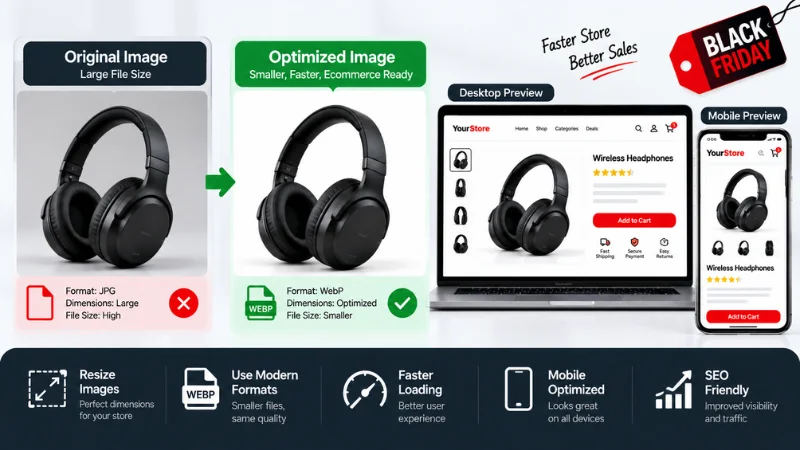
Black Friday traffic can increase image requests significantly. Large or poorly optimized images can slow your store. Optimize every image before your campaign goes live. Focus on dimensions, file size, format, and mobile quality.
Resize Images for Each Platform
Different ecommerce platforms have different image requirements. Image sizes can also vary by placement and content type.
Prepare images for platforms such as:
Do not use one universal size everywhere. Check each platform’s current requirements before uploading. Product pages, thumbnails, banners, and ads may need different formats.
Marketplace images can also face issues beyond file size. Amazon requires the main product image to show the product at least 85% of the image area. Etsy recommends landscape or square orientation for the first listing photo. Keep enough space around the product to prevent important details from being cropped.
Check platform requirements before your Black Friday launch. This can help prevent cropping issues, rejected images, and last-minute delays.
Compress Images Without Losing Quality
Large image files can slow down ecommerce pages. This matters even more during Black Friday traffic. Compress images before uploading them to your store. Use proper dimensions instead of uploading oversized files.
Consider these optimization steps:
- Use WebP when the platform supports it.
- Resize images to their actual display needs.
- Compress files without visible quality loss.
- Keep file sizes as small as practical.
- Check loading performance on mobile devices.
Image optimization should balance quality and performance. Do not compress images so much that products look blurry.
Check Mobile Image Quality
Many shoppers browse ecommerce stores from mobile devices. Your product images must remain clear on smaller screens.
Check every important image for:
- Clear product visibility
- Correct cropping
- Readable promotional text
- Clear product thumbnails
Open your product pages on an actual mobile device. Do not rely only on desktop previews. Check the first product image before scrolling further. Make sure shoppers can understand the product immediately.
Prepare Your Ecommerce Product Pages
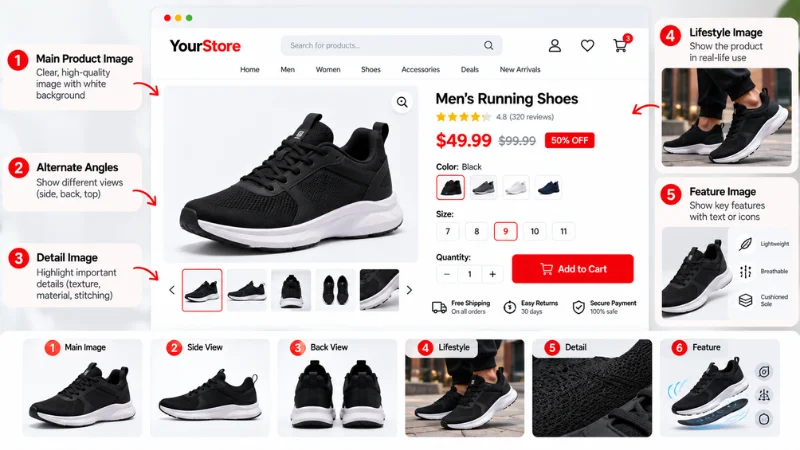
Your product images should support the entire buying journey. Black Friday shoppers often compare products quickly. Review important product pages before your campaign starts. Make sure every image supports clear product understanding.
Update Product Images
Start by reviewing the images on important product pages. Replace outdated or weak images before Black Friday.
Make sure:
- The main image is strong and clear.
- The product gallery is complete.
- Images accurately match the product.
- Images use consistent editing.
- Promotional images show current offers.
Your main image should clearly show the product. Avoid unnecessary elements that distract from it. Also check every image against the actual product. This helps prevent misleading or outdated product visuals.
Improve Image Order
Image order can affect how shoppers understand products. Place the most useful images near the beginning.
A practical product image sequence is:
- Main product image
- Alternate angle
- Detail image
- Lifestyle image
- Feature image
- Size or use image
Start with the clearest product view. Then provide details that answer common shopper questions. Use lifestyle images after essential product views. This gives shoppers both clarity and real-world context.
Add Social Proof
Product images can work alongside social proof. This can help shoppers feel more confident about purchases.
Where appropriate, include:
- Customer reviews
- Customer photos
- User-generated content
- Product ratings
Customer reviews, ratings, and user-generated photos can strengthen product pages. They also complement professionally edited product images by showing products in real-world use.
Prepare Images for Black Friday Ads
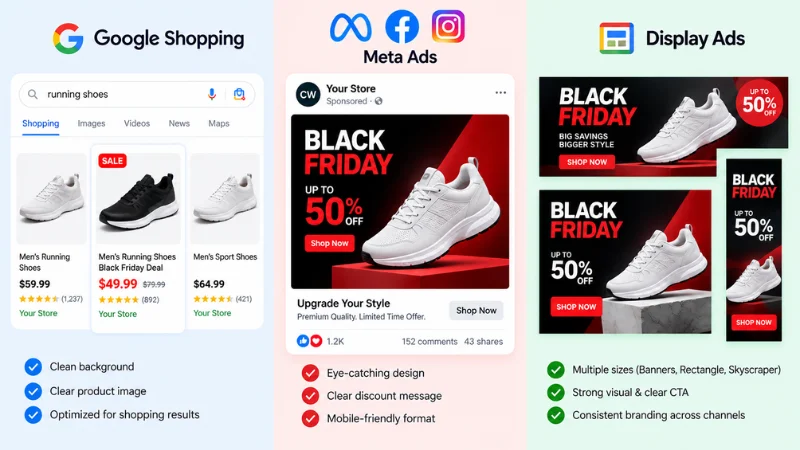
Black Friday ads need clear and platform-ready product images. Each advertising platform can use different image formats. Prepare your ad visuals before launching your campaigns. This helps prevent last-minute resizing and design problems.
Google Shopping Images
Google Shopping images should show the product clearly. Check Google’s official product image requirements before uploading your images.
Before uploading, check:
- Product visibility
- Background quality
- Image quality
- Correct product representation
Avoid images that make the product difficult to identify. Also check that the image matches the product listing. The advertised product should look the same after purchase.
Meta Ads
Meta Ads can use several creative formats. Prepare separate versions for different placements and devices.
Consider preparing:
- Product feed images
- Square creatives
- Vertical creatives
- Story formats
- Reels formats
Do not simply stretch one image across every placement. Create suitable versions for each format instead. Keep important products and messages inside safe areas. This helps prevent unwanted cropping across placements.
Display Ads
Display advertising can require multiple creative dimensions. Prepare the required sizes before your campaign launches. Create different versions for your planned placements. Check product visibility and text readability in each version.
Keep the design simple and consistent across all sizes. This creates a more professional Black Friday campaign. Test every creative before sending it live. Check cropping, product visibility, text, and overall image quality.
Build a Black Friday Photo Editing Workflow
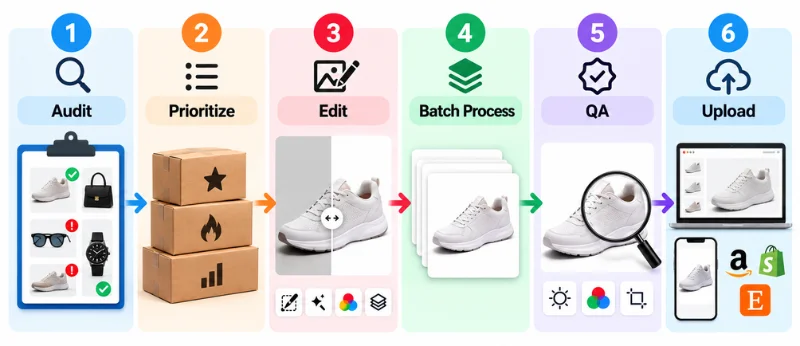
A clear workflow keeps Black Friday image work organized. It also helps teams manage large product catalogs efficiently. Start by listing every image that needs editing. Then standardize the editing process and review finished files.
Create a Product Image List
Create one central list for all image editing tasks. This makes progress easier to track before Black Friday.
Useful columns include:
| Product | Priority | Edit Needed | Size | Platform | Status |
|---|---|---|---|---|---|
| Product A | High | Retouch | 2000px | Shopify | Done |
| Product B | High | Background Removal | 2000px | Amazon | Pending |
You can also add deadlines, editors, or file links. Prioritize products based on campaign importance and deadlines. Update the status as each image moves through editing. This helps your team identify pending work quickly.
Create Editing Templates
Templates help maintain consistent editing across product images. They also reduce repetitive work for large catalogs.
Standardize important editing elements such as:
- Background
- Shadow
- Crop
- Padding
- Color treatment
- Image dimensions
Create separate templates when platforms need different formats. Keep the final templates simple and easy to reuse. This helps editors produce more consistent results. It also makes quality control easier later.
Batch Edit Similar Products
Group similar products before starting large editing batches. This can make the workflow faster and more consistent.
Group products by:
- Product category
- Background type
- Editing complexity
- Target platform
- Black Friday campaign
For example, similar products may need identical background treatment. They can then move through the same editing workflow. Complex products may need separate manual editing. Avoid forcing every product through one automated process.
Create a Final QA Process
Every finished image should pass a final quality check. Complete this check before uploading images to campaigns.
Check each image for:
- Product accuracy
- Clean edges
- Correct shadows
- Accurate colors
- Correct dimensions
- Correct file format
- Appropriate file size
- Text accuracy
- Consistent branding
Compare edited images with the original product photos. Make sure important product details remain unchanged. Finally, check finished files before publishing them. A final QA process can catch small issues early.
Black Friday Product Image Preparation Timeline
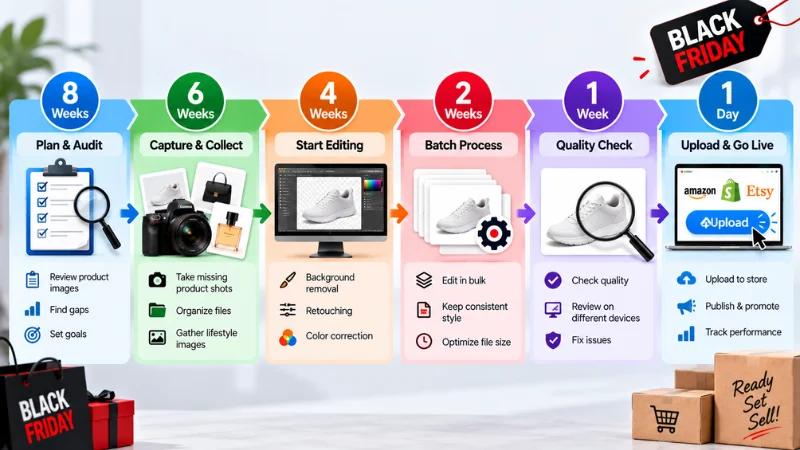
Black Friday image preparation should start several weeks early. Waiting until the final week creates unnecessary pressure. Keep your Black Friday offer deadline in mind when planning image editing and promotional assets.
8 Weeks Before Black Friday
Start with planning and image auditing.
- Audit your existing product images.
- Select priority Black Friday products.
- Plan your campaign visuals.
- Identify missing product images.
- List products needing professional editing.
This stage helps you understand the total workload. It also gives your team enough preparation time.
6 Weeks Before Black Friday
Begin the main image production process.
- Start major product photo editing.
- Create required lifestyle images.
- Prepare Black Friday campaign templates.
- Standardize backgrounds, crops, and image dimensions.
Focus first on your highest-priority products. Do not wait until the campaign deadline approaches.
4 Weeks Before Black Friday
Your main product editing should be well underway.
- Finish priority product images.
- Create promotional product graphics.
- Prepare marketplace-specific image versions.
- Review completed images for consistency.
This is also a good time for corrections. Fix major image issues before the final campaign stages.
2 Weeks Before Black Friday
Move from production toward final preparation.
- Finalize website visuals.
- Prepare email campaign images.
- Prepare social media images.
- Complete remaining product image edits.
- Finish important advertising creatives.
At this point, most major editing should be complete. Keep enough time for unexpected revisions or corrections.
1 Week Before Black Friday
Focus on final quality checks and publishing.
- Complete final image QA.
- Check image dimensions.
- Check mobile image display.
- Check file sizes.
- Verify file formats.
- Upload final image assets.
Review the most important product pages again. Make sure the correct images are live before the sale.
1 Day Before Black Friday
Avoid starting major editing work at this stage.
Instead:
- Verify live product images.
- Check promotional graphics.
- Confirm important banners are displaying correctly.
- Check critical product pages.
Only make essential last-minute corrections. Your main image production should already be finished. Keep backup files ready, including any separate promotional graphics needed for your Cyber Monday deals.
Final Black Friday Product Image Checklist
Use this product image checklist before launching your Black Friday campaign. Check every important image before publishing or promoting it.
Product Images
- ☐ Bestselling products are fully edited.
- ☐ Product backgrounds are consistent.
- ☐ Products are properly cropped.
- ☐ Product colors are accurately corrected.
- ☐ Required retouching is completed.
- ☐ Important product angles are available.
- ☐ Lifestyle images are ready.
Promotional Images
- ☐ Black Friday website banners are ready.
- ☐ Sale graphics are ready.
- ☐ Social media images are ready.
- ☐ Email campaign images are ready.
- ☐ Black Friday ad creatives are ready.
Technical
- ☐ Images are resized for each platform.
- ☐ Images are properly compressed.
- ☐ Mobile image quality is checked.
- ☐ File names are checked.
- ☐ Alt text is prepared.
Final QA
- ☐ Product pages are checked.
- ☐ No wrong products appear.
- ☐ No outdated prices appear.
- ☐ No expired offers appear.
- ☐ No broken images appear.
- ☐ No blurry images appear.
Download the Free Black Friday Product Photo Checklist
Keep this checklist handy and use it to track your product image preparation before Black Friday.

Common Black Friday Product Image Mistakes
Black Friday image mistakes can create last-minute problems. They can also affect product presentation and customer trust. Avoid these common mistakes before your campaign launches.
Waiting Until Black Friday Week
Starting image editing too late creates unnecessary pressure. Large catalogs can require weeks of editing and review. Start with priority products several weeks earlier. Keep the final week for QA and essential corrections.
Editing Every Product Equally
Not every product needs the same editing priority. Start with bestsellers and heavily promoted products. Then move to lower-priority catalog items. This helps teams manage large editing workloads efficiently.
Using Inconsistent Product Images
Inconsistent images can make your catalog look unorganized. Different crops, backgrounds, or colors can reduce visual consistency. Standardize important editing elements across your catalog. Keep dimensions, backgrounds, shadows, and product scale consistent.
Adding Too Much Promotional Text
Promotional graphics should communicate offers quickly. Too much text can distract shoppers from products. Keep important messages short and easy to read. Let the product remain the main visual focus.
Ignoring Mobile Displays
Many shoppers view ecommerce pages on mobile devices. Images must remain clear on smaller screens. Check cropping, product visibility, and text readability. Also test important images on mobile devices.
Using Low-Quality Product Photos
Low-quality source photos limit the final editing result. Blurry or poorly lit images may need additional work. Use the highest-quality original files available. Enhance them without creating unrealistic details.
Forgetting Marketplace Requirements
Different marketplaces can have different image requirements. Ignoring them can cause upload or listing problems. Check requirements before preparing marketplace image versions. Create separate assets when platforms need different formats.
Not Keeping Original Files
Always keep original product images safely stored. They provide a useful backup for future editing. Original files also help create new campaign versions. Avoid replacing originals with edited files.
Changing Product Appearance Too Much With AI
AI tools can speed up some image production tasks. However, excessive changes can make products look inaccurate. Check AI-assisted images against the original product photos. Pay close attention to shape, color, texture, and details. Use human review before publishing AI-assisted product images.
How Much Photo Editing Do You Need for Black Friday?
The amount of editing depends on your store and product catalog. Not every product needs the same level of preparation.
| Store Type | Typical Image Work |
|---|---|
| Small Store | Core product cleanup |
| Growing Store | Full catalog optimization |
| Large Store | Bulk editing and campaign visuals |
| Marketplace Seller | Platform-specific image preparation |
| Fashion Store | Retouching and mannequin editing |
| Jewelry Store | Advanced retouching and masking |
Choose the editing level based on product complexity and campaign priority. Focus your time and budget on the most important images.
DIY vs Outsourcing for Black Friday Photo Editing
You can edit product images yourself or outsource the work. The right choice depends on your workload and deadline.
When DIY Editing Makes Sense
DIY editing can work for smaller product catalogs. It works best when images need simple editing.
Consider DIY when:
- You have a small product catalog.
- Images need basic background removal.
- Your team has editing skills.
- You have enough time before Black Friday.
When Outsourcing Makes Sense
Outsourcing can help with large or complex editing projects. It can also reduce pressure near campaign deadlines.
Consider outsourcing when:
- You have a large batch of images to edit.
- Products need consistent editing.
- Images need complex retouching or masking.
- You need ghost mannequin editing.
- Black Friday is less than three weeks away.
A Hybrid Approach
You can combine both workflows when appropriate. Handle simple images in-house and outsource complex batches. This approach can balance cost, quality, and turnaround time. Choose based on your actual editing workload.
Should You Use AI or Professional Photo Editing for Black Friday?
AI can speed up many Black Friday image tasks. Professional image editing can handle more complex visual requirements. The right choice depends on the editing task. Consider accuracy, consistency, volume, and turnaround time.
When AI Editing Works
AI works well for simple, repetitive image tasks at scale.
It can help with:
- Background removal
- Basic image cleanup
- Image resizing
- Simple image variations
- High-volume repetitive edits
AI can reduce manual work and speed up large batches. However, review every finished image before publishing. Check product shape, color, details, and overall accuracy.
When Professional Editing Is Better
Some products require more precise manual editing. Complex images can be difficult to process consistently with AI.
Professional editing can be better for:
- Transparent products
- Complex product edges
- Product reflections
- Jewelry products
- High-end retouching
- Ghost mannequin images
- Complex image masking
- Large product catalogs
These images often need detailed adjustments and careful quality control. Professional teams can also manage large editing workflows efficiently.
Choose Based on Your Black Friday Workflow
You do not need to use only one method. Many stores can combine AI and professional editing. Use AI for simple, repetitive tasks when appropriate. Use professional editing for complex or accuracy-sensitive images.
Before choosing a workflow, consider:
- Accuracy: Does the image represent the real product?
- Consistency: Do all images follow the same visual standard?
- Volume: How many images need editing?
- Turnaround: How quickly must the images be completed?
Choose the workflow that matches your products and deadline. For large campaigns, a mixed approach can work well.
Black Friday Photo Editing Pricing and Turnaround
Photo editing costs depend on the service type and image complexity. See the pricing table above for Black Friday rates for each service. Contact us with your image volume and requirements for an accurate quote.
Bulk Black Friday Discount
Qualifying bulk orders can receive up to 50% off plus 5% free images, depending on the service, order volume, and editing complexity.
How Fast Can Your Catalog Get Edited?
Actual turnaround depends on image complexity, order volume, and project requirements.
- Simple tasks: Up to 5,000 images per day
- Moderate tasks: Up to 4,000 images per day
- Complex tasks: Up to 3,000 images per day
Simple tasks may include background removal, drop shadows, and basic product editing. Moderate tasks may include natural shadows and color adjustments. Complex tasks may include advanced editing, masking, ghost mannequin, and jewelry retouching.
For large BFCM catalogs, confirm your image volume and deadline early. This gives enough time for editing, revisions, and final quality checks.

Black Friday Ecommerce Photo Editing FAQ
How Do I Prepare Product Images for Black Friday Deals?
Audit your existing product images first. Prioritize bestsellers and promoted products, then fix backgrounds, cropping, colors, and retouching.
Do Cyber Monday Deals Need Different Product Images?
Not usually. The same edited images used for Black Friday can carry into Cyber Monday deals. Update only the promotional graphics and sale badges to reflect Cyber Monday-specific offers or extended discounts.
What Makes a Good Black Friday Product Image?
A good product image is clear, accurate, and visually consistent. Use proper cropping, suitable quality, and minimal promotional elements.
Should I Edit All My Product Photos Before Black Friday?
Not necessarily. Prioritize bestsellers, hero products, discounted products, and seasonal items first. Then edit lower-priority products as time allows.
How Early Should I Prepare Product Images for Black Friday?
Start preparing important images several weeks before Black Friday. Begin with an image audit around eight weeks beforehand and finish major editing before the final week.
What Size Should Black Friday Product Images Be?
There is no single size for every ecommerce image. Requirements vary by platform, placement, and image type, so prepare versions for each target use.
Should Ecommerce Product Images Have a White Background?
A white background works well for many ecommerce product images. However, lifestyle or branded backgrounds may suit promotional campaigns better.
Can AI Edit Product Images for Black Friday?
Yes, AI can handle repetitive tasks like background removal, cleanup, and resizing. Always review important product details before publishing AI-edited images.
How Can I Prepare Hundreds of Product Images for Black Friday?
Create a product image list with priorities, editing needs, platforms, and status. Group similar products for batch editing and use templates to maintain consistency.
What Photo Editing Services Are Useful for Black Friday?
Useful services depend on your products and campaign needs. Common options include background removal, clipping paths, retouching, masking, ghost mannequin, multi-clipping path, clipping with shadow, and bulk photo editing.
How Do I Keep Product Images Consistent Across My Store?
Standardize backgrounds, crops, dimensions, shadows, and color treatment. Use reusable templates and complete a final QA check before publishing.