
ImgBB is a free image hosting service that lets users upload images and get instant direct links, HTML embed codes, and BBCode without creating an account. It supports common formats like JPG, PNG, and GIF, making it a popular choice for bloggers, forum users, and anyone who needs quick, anonymous image sharing online.
ImgBB Review Summary
| Feature | Verdict |
| Free Plan | Excellent for quick and free image sharing |
| Ads | Slightly annoying in the free version |
| Image Quality | Original quality preserved (no compression) |
| Ease of Use | Very simple drag-and-drop interface |
| Sharing Options | Direct links, HTML, and BBCode available |
| Best For | Blogs, forums, and temporary image hosting |
Overall Verdict: ImgBB is a reliable free image hosting service for quick uploads and easy sharing, but the free version includes ads and limited control features.
What Is ImgBB? (Overview)
ImgBB is a free image hosting service that lets users upload, store, and share images without creating an account. It provides instant direct image links, HTML embed codes, and BBCode, making it a popular choice for blogs, forums, and social media posts.
ImgBB is commonly used to share images on forums, blogs, and discussion platforms where direct image links are required. The platform supports common image formats such as JPG, PNG, GIF, BMP, and WEBP.
Users can upload images quickly through a simple drag-and-drop interface and choose whether images should expire automatically or stay online. Because of its speed, ease of use, and anonymous upload option, ImgBB is widely used for quick image sharing rather than long-term professional storage.
Key Features of ImgBB
Here are the main features that make ImgBB a popular free image hosting platform:
- Free image hosting without registration
- Supports JPG, PNG, GIF, BMP, WEBP
- Direct links, HTML embed, and BBCode
- Unlimited bandwidth for sharing
- Optional account for galleries
- API access for developers
- Mobile-friendly uploads
Pros and Cons of ImgBB
To better understand whether ImgBB is the right choice for your image hosting needs, it’s helpful to look at both its strengths and limitations. Below is a quick overview of the main advantages that make ImgBB popular, along with a few drawbacks you should consider before relying on it for long-term use.
Pros of ImgBB
- Free image hosting without registration
- Fast drag-and-drop uploads
- Direct links, HTML, and BBCode support
- Mobile-friendly interface
Cons of ImgBB
- No advanced image management
- Not ideal for professional portfolio hosting
- Risk of image removal if inactive for a long time
Why Use ImgBB for Image Hosting?
There are other image hosting services available in the market. However, ImgBB receives the maximum traffic. The main feature of this platform is its convenience and functionality. Users find it easy to use. You can upload an image in seconds without any complicated steps.
Along with that, users can be completely anonymous while uploading and sharing the images. It can be appealing to people who are concerned about privacy. Unlike other image hosting sites, ImgBB is mobile-compatible. The platform works smoothly on mobile devices. Thus, it allows users to upload and share images directly from their mobile devices.
Finally, ImgBB is a reliable hosting. Here you will get fast uploading and access to your images. Images can remain accessible long-term if not set to auto-delete, but ImgBB is best suited for sharing rather than permanent archival storage.
Thus, it is ideal for users who want fast image sharing. These benefits make ImgBB a practical choice for users who need fast and simple image hosting without technical complexity.
How to Use ImgBB (Step-by-Step Guide)
Using ImgBB is super easy. So, go to the website and follow the steps described below:
Step 1: Access the ImgBB Website
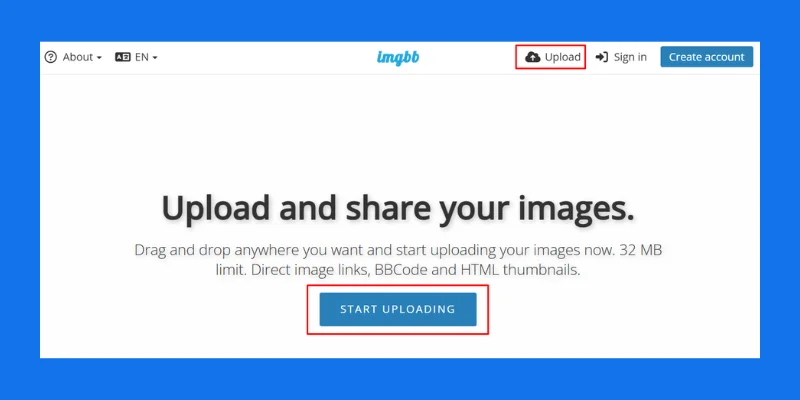
First, you have to access the website. So, go to the ImgBB website. After pressing Enter, you will be directed to the homepage. On the homepage, you will get an option to upload your images.
Step 2: Upload an Image
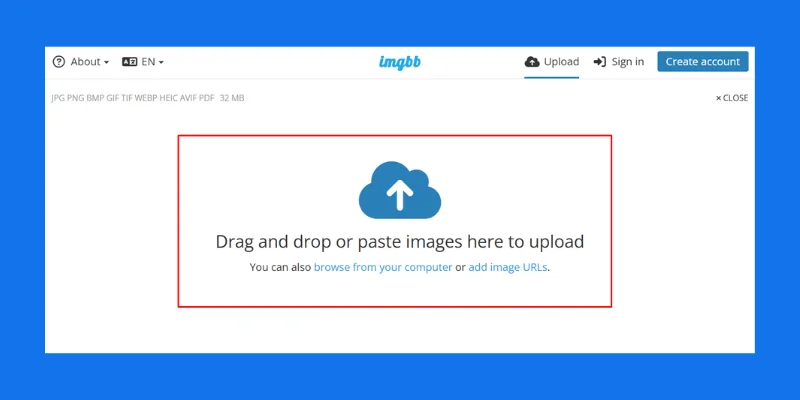
You’ll now see two options for uploading images. The first is the drag-and-drop method, and the second is the file selection method. There’s no need to worry about the image file format. It supports various formats such as JPEG, PNG, GIF, BMP, and more. Many users first create stunning AI-generated images with Midjourney before uploading them to ImgBB for easy sharing.
Step 3: Set Optional Preferences
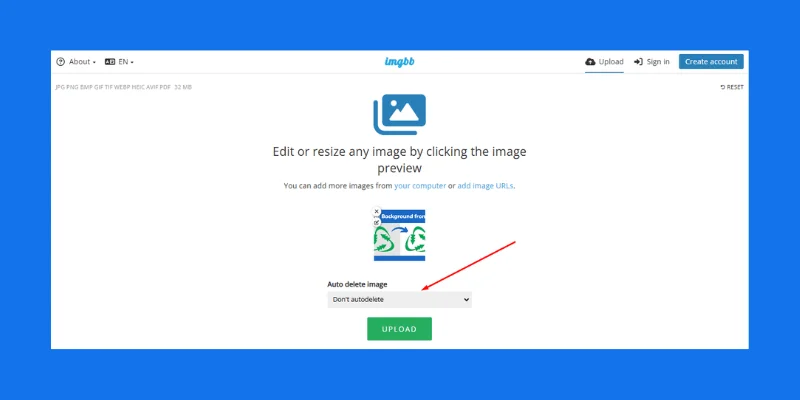
Before uploading, you can choose an expiration time by clicking the “Auto delete image after” dropdown. You can set the image to expire after a set time (e.g., 5 minutes, 1 hour, etc.), or choose “Don’t autodelete” to keep the image permanently hosted.
Then, click the ‘Upload’ button to begin uploading your images. Depending on your internet speed and the file size, the uploading process takes just a few seconds.
Step 4: Get the Shareable Link
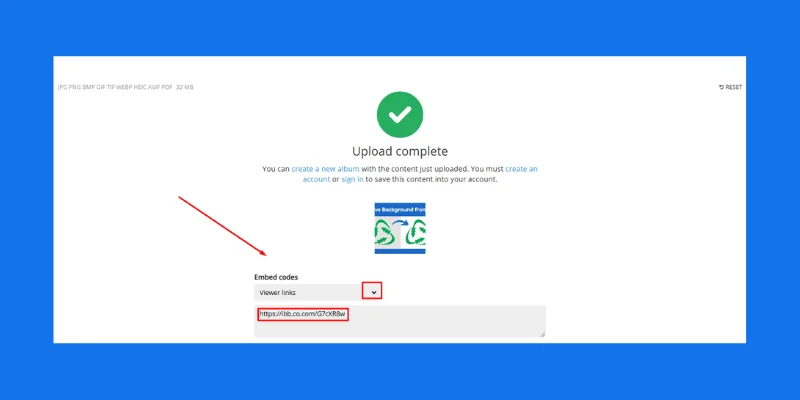
After uploading the image, you will get different options to generate a shareable link. Here are the types of links you will get:
- Direct Link: A simple URL to the image.
- HTML Embed Code: Use this code to embed the image in websites or blogs.
- BBCode: This code is useful for embedding images in forums.
- Linked or Full Image Options: You can choose to share either a linked image (clickable thumbnail) or the full-sized image directly.
Now, copy the link or code that best suits your needs. Then, share it wherever required.
Step 5: Optional Account Creation
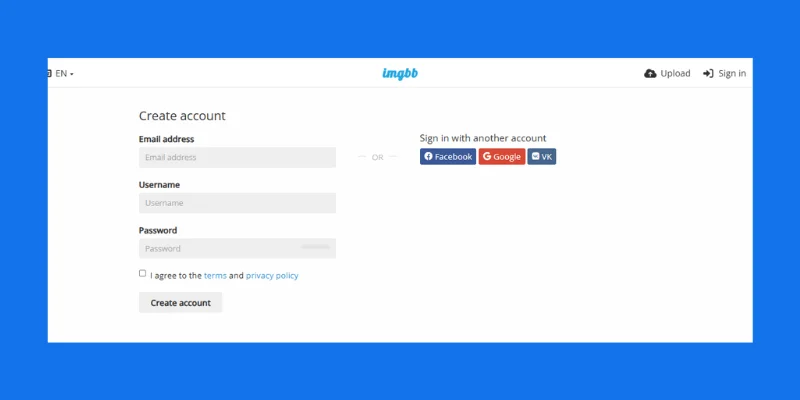
Create an account to manage your files. Creating an account will allow you to organize images into albums or galleries. Also, you can view, edit, or delete uploaded images later.
🧩 Want your images to load faster and look stunning across platforms?
💼 Try Clipping World’s Image Optimization & Retouching Services — boost quality, reduce size, and stay web-ready.
👉 Explore Our Services
Top 10 Alternatives to Free Image Hosting Platforms
If ImgBB doesn’t meet your needs, here are some of the best free image hosting alternatives worth considering.
1. Imgur
Imgur is one of the most popular image-hosting platforms. This website offers unlimited storage with fast uploads. Many industries are using this website to store and share their images. It also has features for social media. So, the users can browse, comment, and share images.
2. Flickr
Flickr is another popular image-hosting site. This is particularly popular among photographers and artists. It offers 1,000 free photo uploads for free accounts. The high-quality features have made it an extensive photo management tool.
3. Google Photos
This is a built-in app for Android users. Google Photos offers 15 GB of free photo storage. The program is run by AI. It automatically organizes the images and allows them to sync across devices. However, you need a Gmail account to use Google Photos. Also, the 15 GB storage is shared with other programs of the Google ecosystem.
4. PostImage
PostImage does not require to creation of an account to upload images. It also offers an image resizing feature. Users can also set the image expiration times. Also, this platform offers unlimited uploads.
5. ImageShack
ImageShack offers some advanced image management tools. You can use this site for fast image hosting and sharing. While it offers free accounts, the features are more limited compared to premium accounts.
6. 500px
500px is popular among professional photographers. They use this site to store their images and share them with their clients. Also, it allows joining a photography community.
7. FreeImageHosting.net
FreeImageHosting.net is another image hosting site that provides unlimited image uploads with no sign-up required. Like ImgBB, you can generate various sharing options like direct links, HTML codes, and BBCode.
8. Photobucket
Photobucket is a highly used image hosting site. It offers different editing tools. Also, it allows you to create photo galleries. That’s why it is helpful for professional photographers and bloggers. They can showcase and sell their photos to online buyers using this platform. Photobucket has high storage capacity, image editing, and privacy settings. However, the free membership has some limitations.
Is ImgBB Worth Using?
ImgBB is worth using for quick, free image hosting and easy sharing, especially for bloggers, forum users, and social media creators. However, users who need advanced storage control or privacy settings may prefer paid alternatives.
Verdict: ImgBB is worth using for quick, free image hosting, but not ideal for advanced media management.
Explore More Image-Related Resources
- Best Free Photo Editing Tools – Enhance, refine, and share your photos for free.
- Optimized Images for the Web – Compress and prepare images to load faster.
- Online Background Removal Tools – Replace image backgrounds easily.
Conclusion
So, ImgBB is a free image hosting site. This platform has been used by different industries to store and share their images. The process of using this platform is easy with a simple user interface. It has made it popular among all types of users. Also, users do not need to create an account.
However, creating a free account allows you to organize images into galleries and manage your uploads more easily. Overall, ImgBB remains one of the most convenient free image hosting platforms for fast sharing and simple use.
FAQ – ImgBB Free Image Hosting
No, ImgBB does not automatically compress images. Your files are hosted in their original quality unless you resize them before uploading.
Images can stay online permanently if you choose the “Don’t autodelete” option. Otherwise, you can set an expiration time during upload.
Yes, ImgBB provides direct links and HTML embed codes that allow you to display images on websites, blogs, and forums easily.
ImgBB allows anonymous uploads, but it does not offer strong privacy controls like password protection. It’s best used for public or non-sensitive images.
No, you can upload images to ImgBB without creating an account. However, signing up lets you manage your uploads, organize them into albums, and edit or delete images later.
Yes, ImgBB allows anonymous uploads without registration. However, without an account you cannot manage or delete images later.