
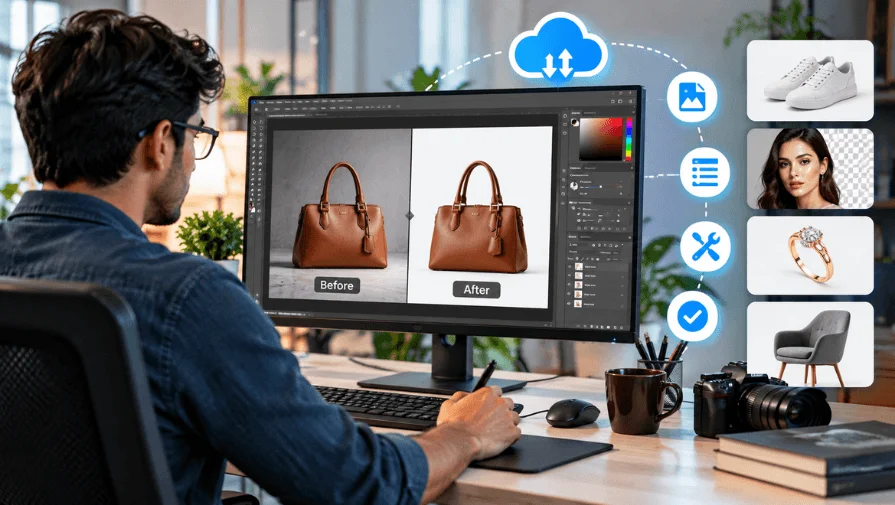
A remote photo editor edits images for clients from another location. Businesses use this service to manage image editing efficiently. They can support bulk projects, regular editing, and specialized work. This helps businesses manage photo editing without an in-house team.
You should hire a professional remote editing team when editing takes too much time. It can also help when you need regular or bulk image editing. Photographers, eCommerce brands, agencies, and studios can benefit from remote editing support.
What Is a Remote Photo Editor?
A remote photo editor edits images from outside your workplace. They work online using file-sharing and communication tools. You send images with your editing requirements and references. The editor completes the work and returns the final files.
Unlike in-house editors, remote editors work off-site. They may work independently or as part of an editing team. Photographers, eCommerce brands, agencies, and studios often use them. They can also support businesses working with online marketplaces.
How Does Remote Photo Editing Work?
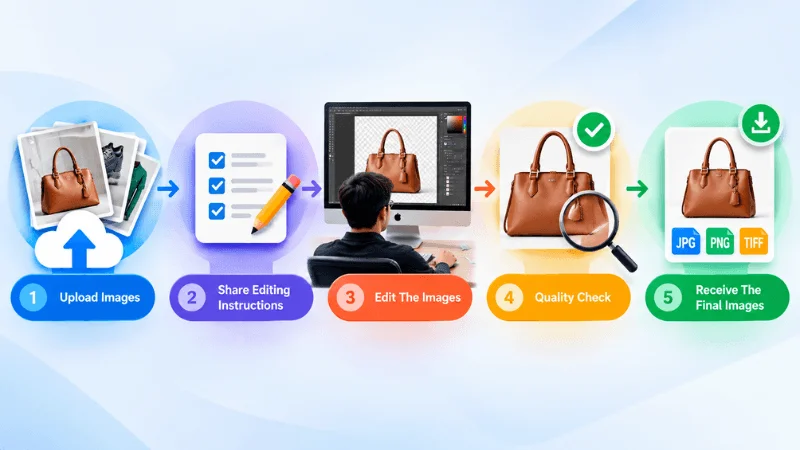
Remote photo editing usually follows a simple online workflow. The process can vary based on project requirements.
1. Upload Your Images
Send your images through a secure file-sharing platform. You can upload individual or bulk image files.
2. Share Editing Instructions
Provide editing requirements, references, and output specifications. Clear instructions help maintain a consistent editing style.
3. Edit The Images
The remote editor processes the images based on your requirements. They apply the requested edits and follow your preferred style.
4. Quality Check
Edited images go through a quality review before delivery. This helps identify errors and maintain consistent results.
5. Receive The Final Images
The completed images are uploaded to the agreed location. You can then review and use the final files.
Why Hire A Remote Photo Editor?
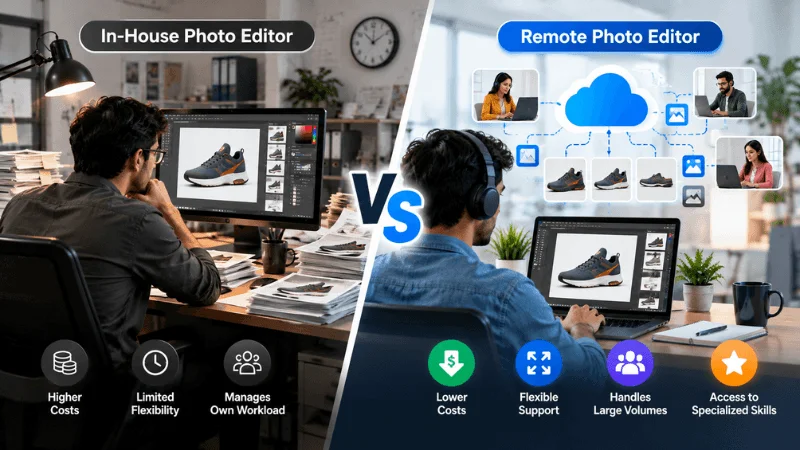
Hiring a remote photo editor can support different business needs. It can simplify image production and ongoing editing tasks.
1. Reduce Your Editing Workload
Photo editing can take hours for each project. A remote editor can handle these repetitive editing tasks. This lets your team focus on other important work.
2. Save Time On Large Image Projects
Large projects often involve hundreds of images. Editing them individually can take significant time. A remote editor can process these images efficiently.
3. Avoid Full-Time Hiring Costs
Hiring an in-house editor involves ongoing business expenses. These may include workspace, equipment, and employee-related costs. Remote editing lets businesses outsource work as needed.
4. Handle Large Image Volumes
Some businesses need editing for hundreds of images. Others may need thousands of images each month. Remote editing teams can support these larger workloads.
5. Access Specialized Editing Skills
Different images require different editing techniques. Remote editors may specialize in specific editing services. These services can include clipping path, photo retouching, product color correction, and eCommerce photo editing.
6. Maintain Consistent Image Quality
Consistent editing creates a more professional visual style. This matters when businesses publish many product images. A remote editor can follow your preferred editing guidelines.
7. Scale Editing During Busy Periods
Image workloads can increase during seasonal campaigns. This often happens during product launches and major sales. Remote editors can provide additional editing support when needed. This can help manage temporary increases in image volume.
8. Focus More On Core Business Tasks
Editing can become a repetitive part of daily operations. Outsourcing these tasks can free up internal resources. Your team can then focus on core business activities.
Remote Photo Editor vs In-House Photo Editor
These two editing setups differ mainly in how they work with your team and projects. Remote editors offer more flexibility for project-based work, while in-house editors provide closer day-to-day collaboration. The right setup depends on your project and workflow.
| Factor | Remote | In-House |
|---|---|---|
| Location | Off-site | On-site |
| Hiring | Flexible | Full-time |
| Workspace | Own setup | Company setup |
| Equipment | Usually own | Often provided |
| Workload | Project-based | Team capacity |
| Bulk Projects | Flexible capacity | Fixed capacity |
| Communication | Online | Direct |
| Management | Remote workflow | Internal workflow |
| Flexibility | Project needs | Staff availability |
Both options can work for different business needs. Your choice depends on workload, workflow, and editing requirements.
Who Should Hire a Remote Photo Editor?
Remote photo editing can support many types of businesses. It is especially useful for businesses with regular image workloads.
Photographers
Photographers can outsource post-production after photo sessions. This helps manage large batches of client images.
eCommerce Businesses
eCommerce brands need consistent product images for online stores. Remote editors can prepare images for different marketplaces.
Photography Studios
Studios often handle multiple client projects at once. Remote editors can support their post-production workload.
Marketing Agencies
Agencies may manage images for multiple clients. Remote editors can provide additional editing capacity when needed.
Fashion Brands
Fashion brands often produce catalogs and campaign images. Remote editors can support regular fashion image editing.
Jewelry Businesses
Jewelry images often require detailed and careful editing. Remote editors can handle clipping, retouching, and color correction.
Real Estate Businesses
Real estate companies may process many property images. Remote editors can support regular property photo editing.
What Photo Editing Services Can A Remote Photo Editor Provide?
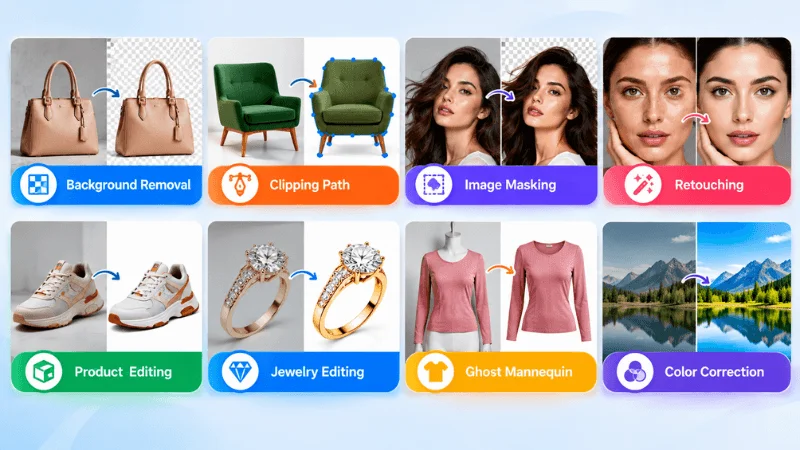
A professional photo editor can handle many types of image editing. The right service depends on your image and project needs.
Background Removal
Remove unwanted backgrounds from product and commercial images. This creates clean images for websites and online stores.
Clipping Path
Create precise paths around products and other subjects. It works well for images needing clean background separation.
Image Masking
Mask complex subjects with hair, fur, or fine details. This provides more control than basic clipping paths.
Photo Retouching
Improve portraits, products, and commercial images naturally. Retouching can remove distractions while preserving realistic details.
High-End Retouching
Enhance images that require detailed professional retouching. This is common for fashion, beauty, and commercial photography.
Product Photo Editing
Improve product images for online stores and catalogs. Editing can include cleanup, color correction, and background work.
eCommerce Photo Editing
Prepare product images for eCommerce platforms and websites. Editors can maintain consistent styles across large image collections.
Jewelry Photo Editing
Enhance jewelry images while preserving fine details and textures. Common edits include retouching, color correction, and background cleanup.
Ghost Mannequin Editing
Create clean apparel images without showing the mannequin. This technique gives clothing a professional product presentation.
Color Correction
Adjust colors, brightness, contrast, and overall image balance. This helps maintain consistent colors across product collections.
When Should You Hire A Remote Photo Editor?
You should hire a remote photo editor when editing becomes difficult to manage. Remote support can be useful when:
- A large image workload takes too much time to manage.
- Regular editing tasks interfere with your core business work.
- Consistent image quality is important across multiple projects.
- Bulk orders create ongoing photo editing demands.
- Specialized editing skills are needed for complex projects.
- Seasonal campaigns cause temporary increases in image volume.
- A full-time editor is unnecessary for your current workload.
How To Choose A Remote Photo Editor
Choosing the right editor can affect your image quality and workflow. Consider these factors before starting a long-term project.
1. Check Their Editing Portfolio
Look for examples similar to your required editing style. Before-and-after samples can show their actual editing quality.
2. Review Their Editing Skills
Make sure they offer the editing techniques you need. Specialized projects may require specific Photoshop skills.
3. Understand Their Quality Control
Find out how completed images are reviewed before delivery. A clear quality process can help reduce editing errors.
4. Confirm Their Turnaround Time
Your editor should meet your project deadlines consistently. Discuss delivery times before starting regular work.
5. Discuss Communication Methods
Clear communication makes remote projects easier to manage. Agree on file sharing, feedback, and revision methods.
6. Consider Their Bulk Editing Capacity
Large projects require enough editing capacity and resources. Ask how they handle high-volume image orders.
7. Request Sample Edits
A small test project can reveal their editing consistency. Use relevant images to evaluate the final results.
8. Compare Pricing And Value
Price should not be the only deciding factor. Consider quality, turnaround, communication, and overall workflow.
How Much Does A Remote Photo Editor Cost?
Remote photo editing costs vary depending on the editing complexity, image volume, turnaround time, and type of service. Editors may charge per image, project, or hour. Bulk projects may also qualify for discounted rates. For example, Clipping World offers different photo editing services at per-image rates:
| Photo Editing Service | Starting Price |
|---|---|
| Clipping Path | $0.29/image |
| Background Removal | $0.20/image |
| Drop Shadow | $0.35/image |
| Image Masking | $1.00/image |
| Product Retouching | $0.50/image |
| Jewelry Retouching | $3.50/image |
| Ecommerce Photo Editing | $0.20/image |
These prices are examples from Clipping World and may vary depending on project requirements, image complexity, and volume. Bulk discounts may also be available.
Pricing Factors
Several factors can affect the final cost:
- Editing Complexity — Complex images require more editing time.
- Image Quantity — Larger orders may qualify for bulk discounts.
- Turnaround Time — Urgent projects may have different pricing.
- Editing Technique — Advanced techniques may require specialized skills.
- Image Quality — Poor-quality images may require additional corrections.
- Project Requirements — Custom requirements can affect the final price.
For example, basic clipping path work may cost less than detailed jewelry retouching or photo restoration.
Remote Photo Editor for eCommerce Businesses
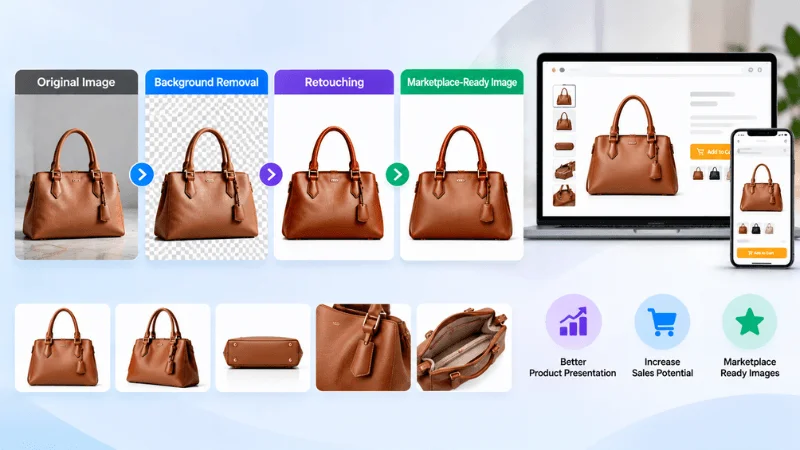
eCommerce stores need clean and consistent product images. A remote photo editor can handle different product editing tasks. Common services include product background removal, product retouching, ghost mannequin, color correction, and marketplace-ready editing.
These services can support stores on Amazon, Shopify, and WooCommerce. They can also help maintain a consistent visual style across product catalogs.
Remote Photo Editor For Photographers
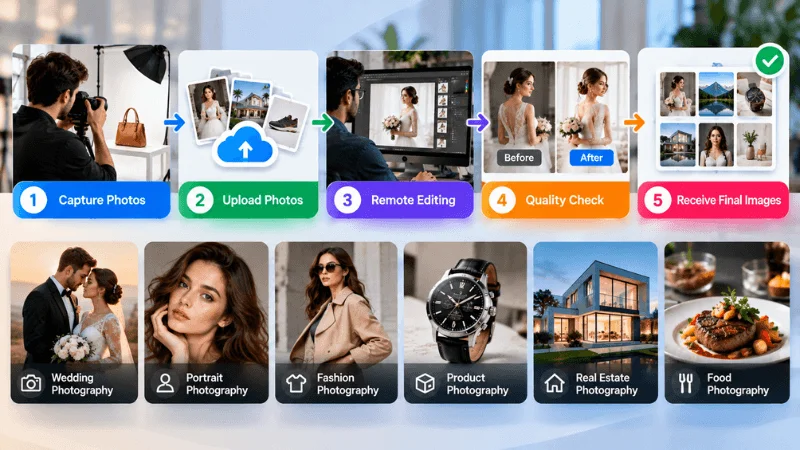
Photographers often spend significant time on post-production. A remote photo editor can handle repetitive editing after shoots.
Remote editing can support different photography styles, including:
- Wedding Photography — Process large batches from weddings and events.
- Portrait Photography — Improve skin, lighting, colors, and distracting details.
- Fashion Photography — Refine portraits, clothing, colors, and campaign images.
- Product Photography — Clean and prepare images for catalogs and online stores.
- Real Estate Photography — Correct exposure, colors, and distracting elements.
- Event Photography — Process large image collections after events.
Outsourcing post-production can reduce the photographer’s editing workload. It also gives photographers more time for shooting and client work.
How To Work With A Remote Photo Editor
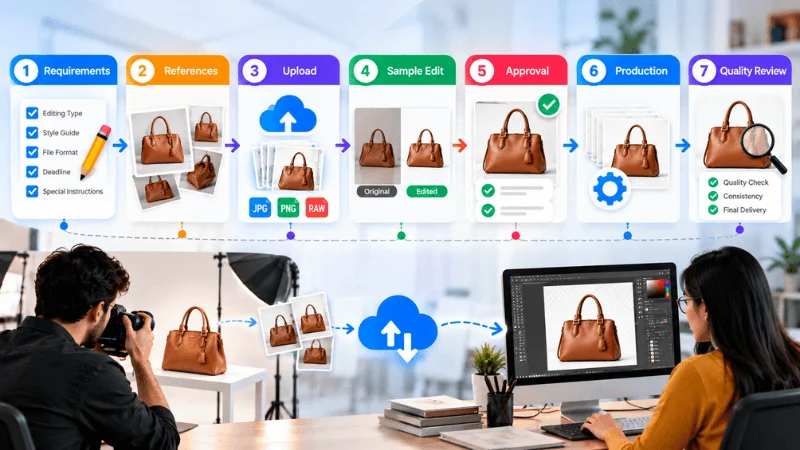
A clear workflow makes remote photo editing easier to manage. Follow these steps to build an effective working process.
Step 1: Define Your Editing Requirements
Explain exactly how you want your images edited. Mention file formats, dimensions, and specific editing preferences.
Step 2: Prepare Reference Images
Provide examples that show your preferred editing style. References help the editor understand your visual expectations.
Step 3: Upload Your Photos
Send the images through an agreed file-sharing platform. Organize files clearly when working with large image batches.
Step 4: Review Sample Edits
Start with a small batch before processing the full project. Review the results against your requirements and references.
Step 5: Approve The Editing Style
Share feedback and confirm the final editing approach. This creates a clear standard for future projects.
Step 6: Start Regular Production
Once the style is approved, begin regular image processing. Keep your instructions consistent across recurring projects.
Step 7: Review Quality Regularly
Check completed images for consistency and technical issues. Regular feedback can help maintain your preferred editing standards.
Common Mistakes When Hiring A Remote Photo Editor
Avoiding common mistakes can make remote editing projects smoother.
- Choosing Only Based On Price — Consider quality, turnaround, and overall value.
- Not Checking The Portfolio — Review work similar to your editing requirements.
- Skipping Sample Tests — Test a small batch before starting a larger project.
- Giving Unclear Instructions — Provide clear requirements and reference images.
- Ignoring Quality Control — Confirm how completed images are reviewed.
- Not Discussing Turnaround Times — Agree on delivery times before starting.
- Not Defining Revision Policies — Clarify revisions and feedback before production begins.
Remote Photo Editor FAQs
What Is A Remote Photo Editor?
A remote photo editor edits images for clients from another location. They work online and deliver completed images digitally.
Why Should I Hire A Remote Photo Editor?
A remote editor can handle image editing outside your internal team. This can help with regular, bulk, or specialized editing needs.
How Does Remote Photo Editing Work?
You send images and editing instructions to the editor. They edit, review, and return the completed files digitally.
How Much Does A Remote Photo Editor Cost?
Pricing depends on editing complexity and image volume. Background removal usually costs less than detailed retouching. Bulk orders often receive lower per-image rates. Request a quote for your specific project requirements.
Can A Remote Photo Editor Handle Bulk Images?
Yes, remote editors can handle large image batches. Capacity depends on the editor or team’s available resources.
How Do I Choose A Remote Photo Editor?
Review their portfolio, editing skills, quality process, and turnaround. Also consider communication, sample edits, bulk capacity, and pricing.
Why Choose Clipping World For Remote Photo Editing Services?
Clipping World provides professional remote photo editing services for businesses, photographers, agencies, and eCommerce brands. Our team handles both individual and bulk image projects, with services including background removal, clipping path, photo retouching, and eCommerce photo editing.
Why Work with Clipping World?
- Get support for a wide range of photo editing requirements.
- Handle large image volumes without adding an in-house editing team.
- Edited images go through quality checks before final delivery.
- Our remote editing process can support both one-time and ongoing projects.
- Get editing support when you need to manage larger or time-sensitive projects.
Whether you need a few edited images or ongoing bulk photo editing, Clipping World can support your workflow with professional remote editing services.
Need A Remote Photo Editor For Your Project?
Have a large batch of images waiting for editing? Send your images and requirements to Clipping World. Our professional editors can handle bulk photo editing projects. Start your free trial today.